
Remove Bloatware From Your MIUI – Xiaomi and Redmi Devices (non-root)

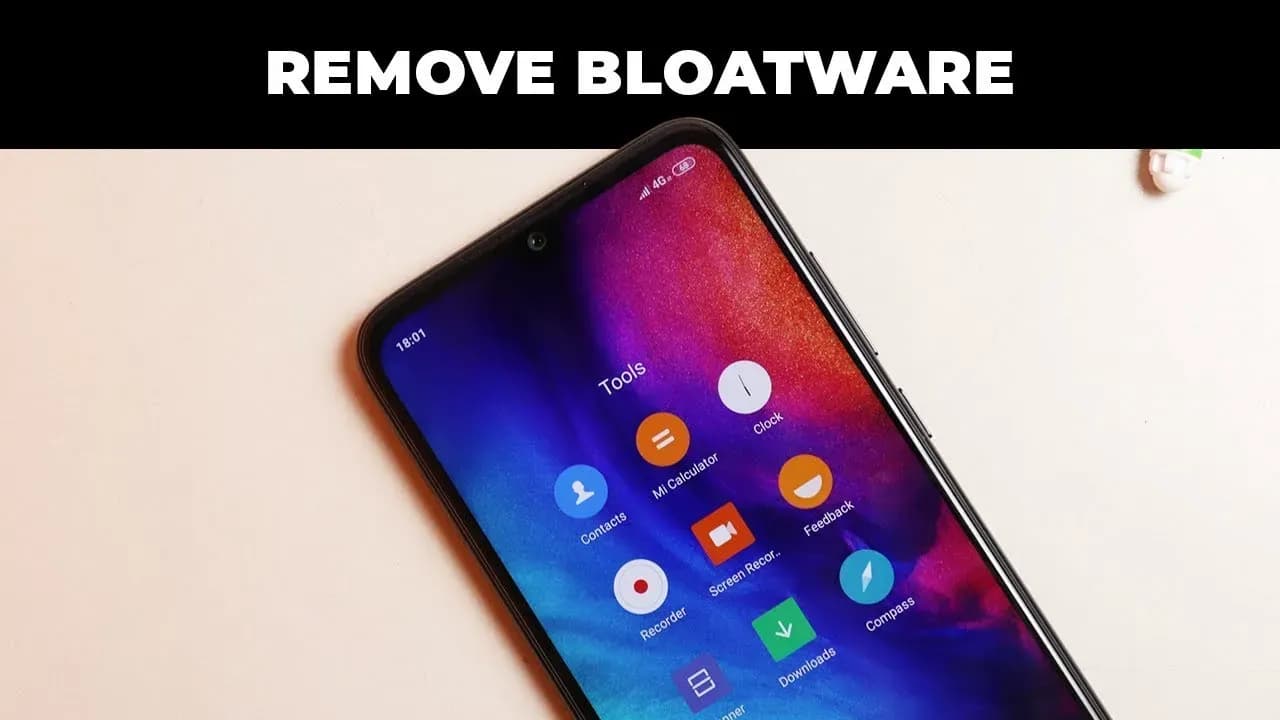
MI User Interface, abbreviated MIUI is an Android-based operating system for smartphones and tablet computers developed by Chinese electronics manufacturer Xiaomi. It is powered by the Android Operating System. MIUI includes various features such as theme support.
Xiaomi’s budget devices are good at taking over the smartphone world.
The company, dominating on the Indian and Chinese markets, manages to deliver low priced smartphones coupled with some high end device specs.
Bloatware on Xiaomi Devices?
The word Bloatware is used for smartphone apps which the vendor locks. Some known vendors include Samsung, Xiaomi, HTC and so on. Developers are using this irksome tactic of locking apps on the phone to make the device’s user interface exclusive.
Uninstall/Disable MIUI Apps in Xiaomi/Redmi Devices Without Rooting
1. MIUI Hidden Settings
The MIUI app Hidden Settings make it easy for developers to perform previously complex tasks in just a few taps. You can, for example, view the Notification log, which has been difficult to get into before.
With the help of MIUI hidden features, you can get rid of some (not all) pre-installed app(You can also uninstall the Google apps).

- Open the MIUI Hidden Settings app.
- Choose the Android version.
- Tap on the Manage Applications.
- Scroll over and tap on whichever app you want to remove from your device.Open the MIUI Hidden Settings app.
- Choose the Android version.
- Tap on the Manage Applications.
- Scroll over and tap on whichever app you want to remove from your device.
- Tap on the “Disable” or “Uninstall” option.
- Then tap on the “Disable app” button in the pop-up.
Now you can get rid of most of the unused apps which were earlier impossible to remove.
2. ADB and Fastboot
Bloatware removal using ADB and Fastboot is a simple method and works with just about any device powered by Android.
This method is a little more complicated and you need a P.C. and ADB installed. You need to follow the steps accurately.
You need to enable USB debugging by going to Settings > About Phone > Tap 7-10 times on MIUI Version. A popout will appear telling you that you have activated Developer Settings.
Then go to Additional Settings and pap on Developer Options, scroll down and activate USB debugging and press OK.
On your PC go to ADB installation folder and type cmd in the adress bar. A command prompt windows will appear.
Now once you have device connected via USB, run adb devices command in terminal to see if your device is connected via ADB.

Now copy and run the commands from below list for the app which you want to remove.
The command is adb shell pm uninstall -k --user 0 package.name
adb shell pm uninstall -k --user 0 com.google.android.apps.docs # Google Drive
adb shell pm uninstall -k --user 0 com.google.android.apps.maps # Google Maps
adb shell pm uninstall -k --user 0 com.google.android.apps.photos # Google Photos
adb shell pm uninstall -k --user 0 com.google.android.apps.tachyon # Google Duo
adb shell pm uninstall -k --user 0 com.google.android.googlequicksearchbox # Google App
adb shell pm uninstall -k --user 0 com.google.android.music # Google Music
adb shell pm uninstall -k --user 0 com.google.android.videos # Play Movies
adb shell pm uninstall -k --user 0 com.android.browser # Mi Browser
adb shell pm uninstall -k --user 0 com.miui.bugreport # Mi Feedback
adb shell pm uninstall -k --user 0 com.miui.compass # Mi Compass
adb shell pm uninstall -k --user 0 com.miui.notes # Mi Notes
adb shell pm uninstall -k --user 0 com.miui.screenrecorder # Mi Screen Recorder
adb shell pm uninstall -k --user 0 com.miui.videoplayer # Mi Video
adb shell pm uninstall -k --user 0 com.miui.player # Mi Music
adb shell pm uninstall -k --user 0 com.xiaomi.midrop # Mi Drop
adb shell pm uninstall -k --user 0 com.xiaomi.mipicks # Mi Apps
adb shell pm uninstall -k --user 0 com.xiaomi.scanner # Mi Scanner
So if you mess something up, do factory reset to get out of trouble.

Google Pixel Watch 5 (45mm)

Samsung Galaxy Watch 8


Keep Reading
If your Android phone won’t turn on, connect it to a tested wall charger for at least 30 minutes, then hold the Power button for several seconds. If nothing happens, inspect the cable, adapter, outlet, charging port, and physical buttons before attempting a forced restart. A phone that appears completely dead may actually have a […]
The safest way to free up storage on Android is to remove temporary files, delete offline downloads you can retrieve again, archive unused apps, and move backed-up photos or large files off the device. Start by checking what is using the space, then work from the least destructive options to the most destructive. Do not […]
You cannot factory reset an Android phone without erasing the information stored locally on it. What you can do is back up your important data, verify that the backup works, perform the reset, and restore the information afterward. Before proceeding, save your photos, messages, contacts, files, app data, authentication accounts, and other irreplaceable information. Do […]
Moving to a new Android phone is easiest during its initial setup. Turn on the new device, choose to copy data from an Android phone, connect the two devices with a cable or pair them wirelessly, and select what you want to transfer. Android can copy most apps, photos, videos, contacts, messages, call history, and […]
If you need to find a lost Android phone, open Google Find Hub in a browser or use the Find Hub app on another Android device. Sign in with the Google Account connected to the missing phone, select it, and check its current or most recent location. You can then make it ring, mark it […]

Six days after Android 17’s stable rollout began on June 16, a growing number of Pixel owners are dealing with a touchscreen bug that makes their devices genuinely unreliable. Swipes invert direction, taps either fail to register or fire multiple times, and screens go briefly unresponsive before recovering. Google has confirmed the bug and says […]

Comments & Discussions
Join the conversation! We use Disqus to handle comments. Click the button below to load the comment section.