
Android Auto has always been about bringing your phone’s most useful features to the car’s display – navigation, music, calls, messages. But beyond the obvious staples, there’s a growing library of compatible apps that quietly expand what the platform can do. Some arrive with a formal announcement; others just appear. Adobe Acrobat Reader falls into the latter category, slipping onto Android Auto as part of the v26.5.0.45958 update without any major fanfare.
It’s an unusual addition – a PDF tool on a car display isn’t the most intuitive pairing – but the implementation is more thoughtful than it might seem at first glance.
The standard mobile version of Adobe Acrobat Reader includes quite a bit: Liquid Mode PDF viewing with adjustable font sizes and navigation, annotation tools like sticky notes, comments and text highlighting, a PDF signer for filling out and sending documents, and Google Drive integration. These are genuinely useful features on a phone screen.
On Android Auto, however, none of those visual tools are accessible. The app disables them entirely – understandably, since reading a PDF while driving isn’t something anyone should be doing. What the free version does provide is a built-in Read Aloud text-to-speech function. Think of it as a basic media player for documents: the app converts standard text PDFs into audio using system voices, letting users listen to reports, articles, or any text-based document during a drive without touching the screen. It’s not flashy, but for anyone who regularly reads work documents, it’s a practical hands-free option.
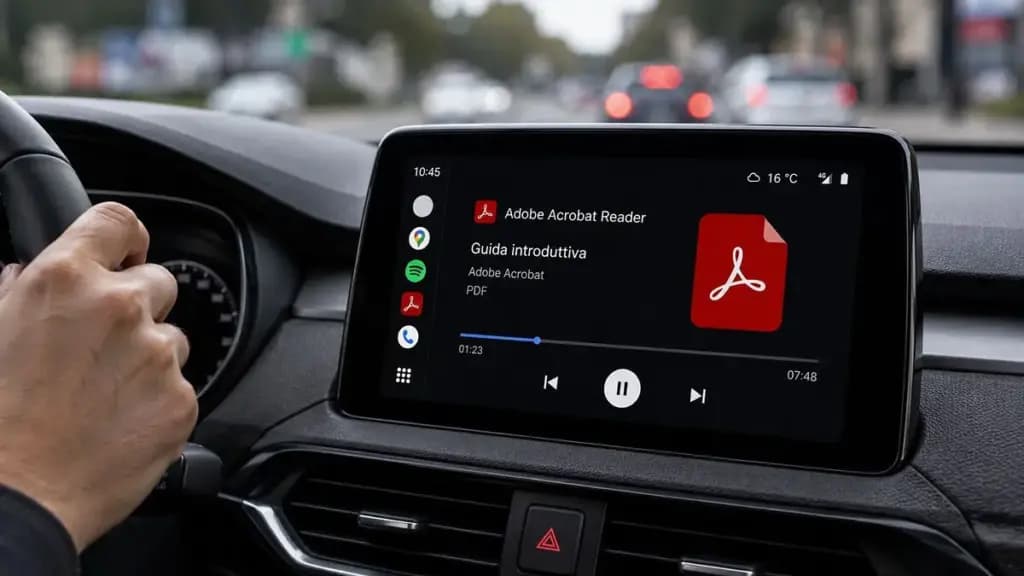
Paid Adobe Acrobat subscribers get a noticeably better experience. While the update labels the enhanced voice feature as “Paid,” it also notes that users can “choose free voices or upgrade for high-quality options” – pointing to the more natural, human-sounding voices Adobe has developed for a significantly better listening experience. For working professionals reviewing research papers, reports, or lengthy documents during a commute, this is where the feature becomes genuinely useful. A long document, or even a full book, could theoretically be consumed entirely during a drive without reading a single word.
Beyond audio quality, the paid version is also listed as including Adobe’s AI assistant, which supports voice and text prompts to query documents, generate summaries, and connect with email, text, notes, and blogs. The full mobile editing suite, optical character recognition (OCR), PDF merging tools, and compression features are also part of the paid subscription.
There’s a catch, though. Even for subscribers, it appears the Android Auto version of the app currently functions primarily as a media player. The hands-free features – including the AI assistant – don’t appear to be accessible through the dashboard at this point, despite being theoretically well-suited to a hands-free environment. Whether these features will open up in a future update remains to be seen, and some users have speculated that’s exactly where things are headed.
For now, free users get a workable document audio player, and paid subscribers get better voices and the promise of more functionality down the line. Those who want to test the paid tier before committing can do so via Adobe’s 7-day free trial.
Google Pixel 11 Pro

Luiza Mosneagu is Reviews Editor at Droid Tools. A psychologist by training and tech writer by passion, she has tested over 60 Android devices since 2020 - always for a minimum of two weeks before writing a word. Her focus is camera quality, everyday usability, and cutting through marketing claims to tell you what a device is actually like to live with.

Google Messages location sharing is testing new map layers, including traffic overlays, satellite views, and terrain options for real-time tracking.

The Google Phone Contacts tab is returning to the bottom bar for beta testers on version 243, rolling back a previous navigation change.

A Google Messages update introduces swipe gestures for timestamps and expanded long-press options, though availability remains limited during rollout.

Google is introducing new Android scam protections, including Enhanced Protection in Messages, call-forwarding warnings, and screen-share privacy defenses.
The next story loads as you reach the end. You can also load it using the button.


Comments & Discussions
Join the conversation! We use Disqus to handle comments. Click the button below to load the comment section.