After the official shutdown of Samsung Messages, Google Messages is now likely the only major texting app remaining for Android users. It offers important capabilities like RCS support, end-to-end encryption, and more; however, it has been missing two basic yet important features. Fortunately, both appear headed for release soon, having reportedly surfaced in the app's ...
After the official shutdown of Samsung Messages, Google Messages is now likely the only major texting app remaining for Android users. It offers important capabilities like RCS support, end-to-end encryption, and more; however, it has been missing two basic yet important features. Fortunately, both appear headed for release soon, having reportedly surfaced in the app’s beta build.
The menu that appears when long-pressing a message in Google Messages currently isn’t very user-friendly. A pill with emoji actions and Photomoji shows up first, followed by four action buttons at the top: copy, delete, star, and a three-dot button.
Tapping that three-dot button opens an additional menu containing options like reply, share, forward, and view details. In short, reaching even basic actions like reply, share, and forward currently requires multiple steps. That’s changing in the newest Google Messages update.
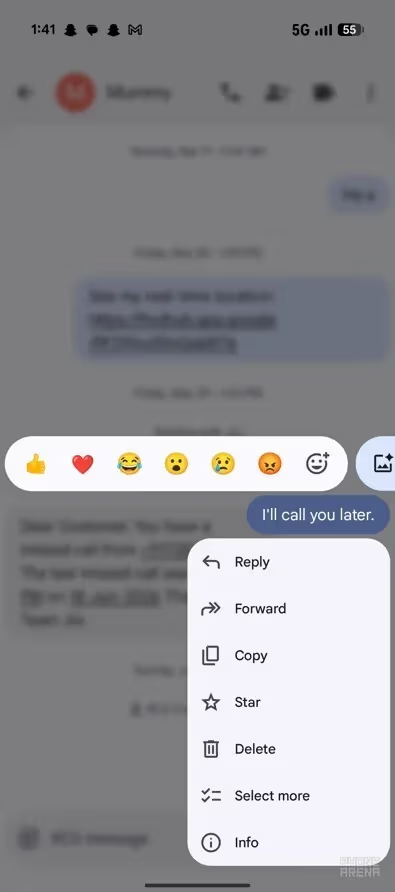
In the latest version, long-pressing a message opens a new menu containing all the essential action buttons at once. A blur effect has also been added to the background, giving the app a more modern look. The emoji bar itself remains unchanged and still appears on long-press.
This change was first spotted back in January of this year, though it was only available to a small group of testers at the time. It’s now rolling out more broadly to devices enrolled in the latest Google Messages beta. This update was spotted on a Pixel 10 running Google Messages beta version 20260803_03_RCO0.
One of the biggest longstanding issues with Google’s messaging app is the inability to select just part of a message. For example, in a message reading “Hey, this is Aman from PhoneArena,” there’s currently no way to select and copy just the “from PhoneArena” portion. Instead, users can only select and copy the entire message.
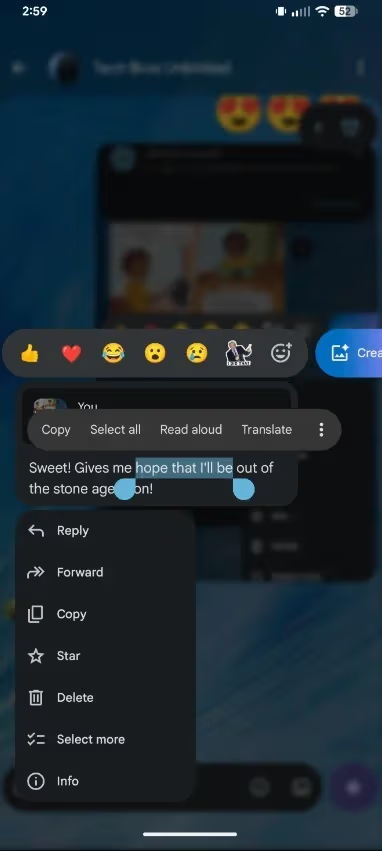
The usual workaround has been copying the full message, pasting it elsewhere, and manually deleting the unwanted parts. Google appears to have recognized that users sometimes need to copy just a section of a longer message rather than the whole thing. Alongside the new long press menu, the company has also rolled out the ability to select only the needed portion of a message.
This feature also first surfaced months ago and now appears to be reaching a wider pool of Google Messages beta testers, though it hasn’t yet appeared on the beta version 20260803_03_RCO0 mentioned above.
Following the closure of Samsung Messages, its former users were directed to switch to Google Messages. Some, however, found the app lacking basic capabilities, including the ability to select and copy a specific part of a text message. One apparent former Samsung Messages user commented that the missing partial-text-selection feature was the only reason they switched to a third-party SMS app instead of Google Messages.
Another user joked about how long both of these features have sat in beta without reaching the stable release. That frustration seems fair, given that it’s been more than six months since both were first spotted, and neither has yet made it into the stable build of the app.
While Google Messages offers standout RCS capability, it has historically lacked several basic functions users expect from any texting app. The good news is that Google appears to be steadily adding them. The app recently received a trash feature, and users can now also change the app’s theme, addressing one of the biggest complaints from former Samsung Messages users.
The new long press menu and the ability to select specific text both appear close to reaching the stable build. Taken together, these changes are gradually shaping Google Messages into one of the more complete messaging apps available for Android.
Apple Watch Series 12

Cristian Penisoara is a Guides Writer and Android specialist at Droid Tools. An Android user since version 2 and a professional event photographer, he combines technical curiosity with a detail-oriented approach - every guide he publishes is tested step-by-step on a real device before it goes live.

Google Messages Enhanced Protection adds Gemini scam analysis and on-device link checks for select Android phones as beta testing begins gradual rollout.
Google Wallet is rolling out an in-app notifications feed on Android alongside expanded digital passport support for Ireland and Italy.
Google Messages Enhanced Protection may replace the single spam toggle with three security options, including cloud link scans, per a new leak.

Google Messages location sharing is testing new map layers, including traffic overlays, satellite views, and terrain options for real-time tracking.
The next story loads as you reach the end. You can also load it using the button.


Comments & Discussions
Join the conversation! We use Disqus to handle comments. Click the button below to load the comment section.