Skip to content
Droid Tools
Latest
/
NewsPhonesReviewsGuides

Devices

  • PhonesLaunches, specs & what comes next
  • WearablesWatches, trackers & everyday tech

Software

  • AppsNew features & useful discoveries
  • Android OSUpdates, rollouts & security patches

Read & learn

  • NewsThe latest across mobile technology
  • ReviewsA closer look at devices & accessories
  • GuidesPractical tips & troubleshooting

In the spotlight

NewsSoutheast Asia smartphone shipments dropped 36% in Q3 2026 amid memory shortagesRead the story
All news
About Droid ToolsContact

Browse by brand

  • AppleiPhone, iPad & Apple Watch
  • SamsungGalaxy, One UI & more
  • GooglePixel, Android & Google apps
  • XiaomiXiaomi, Redmi & HyperOS
  • OnePlusPhones, watches & OxygenOS
  • HuaweiPhones, wearables & HarmonyOS
  • OppoFind, Reno & ColorOS
  • HonorMagic, wearables & MagicOS
  • MotorolaRazr, Edge & Moto

Latest from the brands

NewsSoutheast Asia smartphone shipments dropped 36% in Q3 2026 amid memory shortagesRead the story
Follow the brands behind your everyday tech.All phones

Deals & buying advice

Find your next upgrade.

Reported discounts on phones, wearables and accessories. Check each retailer for current pricing and availability.

Browse all deals

Recent deal coverage

  • PhonesAmazon cuts Samsung Galaxy S26 Ultra price by over $260Read the story
  • WearablesSony WF-1000XM6 earbuds drop to $238 in limited B&H Photo Video discountRead the story
  • NewsWalmart cuts iVANKY ultra-slim magnetic power bank to $15 in 50% discountRead the story
All deals Explore our guides
  • About Us
  • Contact
  • Editorial Policy
  • Review Policy
  • Privacy Policy
  • Terms & Conditions
  • Cookie Policy
  • Affiliate Disclosure
  • Disclaimer
  • HTML Sitemap

Follow Droid Tools

FacebookXInstagramThreadsLinkedInBlueskyTikTokTelegramMastodonRSS Feed
Droid Tools

Droid Tools covers the latest Android news, device reviews, app updates, and OS guides. Independent mobile tech reporting and practical advice.

Explore

  • News
  • Phones
  • Apps
  • Android OS
  • Wearables
  • Guides
  • Reviews
  • Deals

Legal & Info

  • About Us
  • Contact
  • Editorial Policy
  • Review Policy
  • Privacy Policy
  • Terms & Conditions
  • Cookie Policy
  • Affiliate Disclosure
  • Disclaimer
  • HTML Sitemap
© 2026 Droid Tools. All rights reserved.
Home/Apps/WhatsApp beta for Android tests shrinking navigation bar and personal cover photos
Apps

WhatsApp beta for Android tests shrinking navigation bar and personal cover photos

WhatsApp is testing a floating navigation bar that shrinks while scrolling and personal profile cover photos with privacy options. These features are rolling out to select Android beta testers, with no official public release date announced.

Robert Haba• Founder · Editor-in-Chief
Nov 19, 2026•2 min read
WhatsApp beta for Android tests shrinking navigation bar and personal cover photos
0%
Share on XFacebookBluesky
Follow on Google
Trust this source on GoogleAlways see our reviews and tech guides first in search results
Add trusted source

WhatsApp is rolling out a new floating navigation bar that shrinks while scrolling to selected Android beta testers, with an interface image shared via WABetaInfo. Availability is expected to expand to more users in the coming weeks, though WhatsApp has not announced an official release date for all Android users.

Separately, WhatsApp is testing a Contacts tab with online status in beta version 2.26.45.2 on the Google Play Store. Another feature remains under active development after appearing in the 2.26.44.6 update. WhatsApp has not announced when either feature will launch for all users.
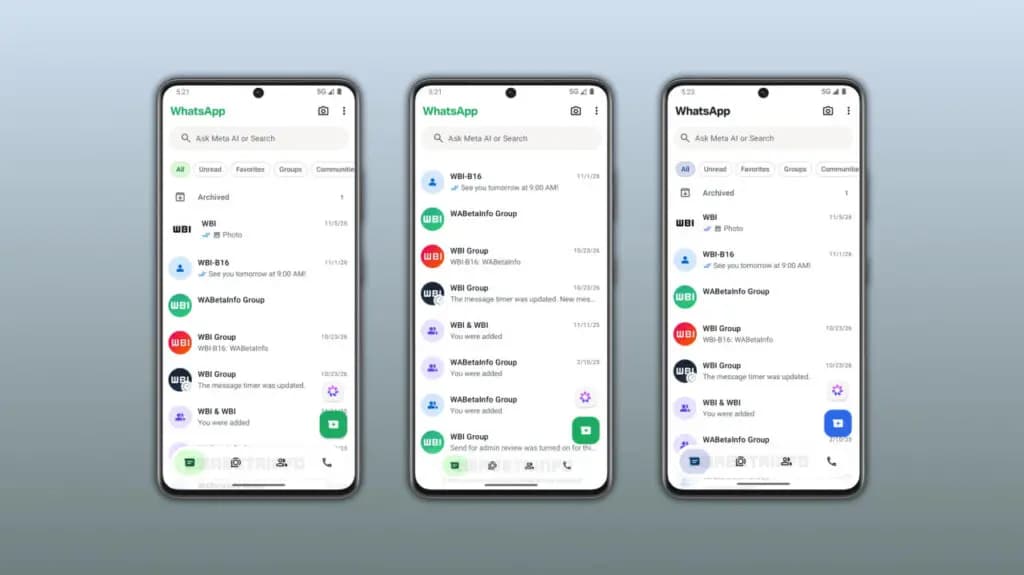
WhatsApp beta for Android tests shrinking navigation bar
Source: WABetaInfo

Personal profile cover photos

WhatsApp is also introducing cover photos for personal profiles, expanding a feature previously limited to WhatsApp Business accounts. Users can place a large landscape photo at the top of their profile while keeping their existing profile picture. The cover photo also appears in the app settings and on the chat info screen when someone opens a conversation.

To add a cover photo, users open their WhatsApp profile and tap the Edit button. WhatsApp offers three options: take a new photo, select an image from the phone gallery, or create an image using Meta AI. WhatsApp automatically adjusts the selected image to fit the cover photo space.

Privacy controls and testing status

WhatsApp provides four privacy options for cover photos: Everyone, My Contacts, My Contacts Except, and Nobody. These settings let users manage who can view their cover photos, and users can hide the image without deleting it.

The cover photo feature appeared in the WhatsApp beta for Android 2.26.43.11 update on the Google Play Store. The rollout is currently limited to selected beta testers, with broader availability expected in the coming weeks. WhatsApp has not announced when the feature will launch for everyone.

You may also likeRelated
AppsGoogle Wallet digital home keys roll out to unlock compatible smart locksNov 18, 2026→AppsGoogle Messages pinned chats may automatically switch layouts based on conversation countNov 18, 2026→AppsSamsung phone app reportedly adding spoofed call detection from Pixel devicesNov 17, 2026→
Trust this source on GoogleAlways see our reviews and tech guides first in search results
Add trusted source
Tags:#beta#leak#messeges#update#whatsapp
Recommended Deals
1 / 9
Samsung Galaxy Watch 8

Samsung Galaxy Watch 8

4.9
$289.99$349.99-17%
Buy on Amazon
* As an Amazon Associate, Droid Tools earns from qualifying purchases. Read our editorial policy
Robert Haba
Robert HabaFounder · Editor-in-Chief
X

Robert Haba is the founder and editor-in-chief of Droid Tools. A lifelong gadget enthusiast with over a decade following the Android ecosystem, he built this publication to cut through the noise and give readers honest, real-world coverage of the tech they actually use.

Next Story in Apps

Google Wallet digital home keys roll out to unlock compatible smart locks

Google Wallet digital home keys now let users unlock compatible smart locks using NFC or UWB, starting with Google Home public preview testers.
→

Latest Stories

Xiaomi Watch S5 41mm launches globally with two-week battery life01

Xiaomi Watch S5 41mm launches globally with two-week battery life

02

Samsung rolls out November 2026 security patch to Galaxy S26, S26+, and Z Flip 8

03

Google to bring proactive Gemini suggestions to Android Auto exclusively on Pixel phones

04

How Android earthquake alerts work across three warning levels

Recommended Deal
-13% OFF
Google Pixel Watch 5 (45mm)

Google Pixel Watch 5 (45mm)

5.0(1,771 reviews)
$459.99$529.99
Buy on Amazon

* As an Amazon Associate, Droid Tools earns from qualifying purchases.

Top Deals

Amazon cuts Samsung Galaxy S26 Ultra price by over $260

Deal
Amazon cuts Samsung Galaxy S26 Ultra price by over $260

Sony WF-1000XM6 earbuds drop to $238 in limited B&H Photo Video discount

Deal
Sony WF-1000XM6 earbuds drop to $238 in limited B&H Photo Video discount

Walmart cuts iVANKY ultra-slim magnetic power bank to $15 in 50% discount

Deal
Walmart cuts iVANKY ultra-slim magnetic power bank to $15 in 50% discount

Continue reading

More from this category →
Google Wallet digital home keys roll out to unlock compatible smart locks
AppsNov 19, 2026

Google Wallet digital home keys roll out to unlock compatible smart locks

Google Wallet digital home keys now let users unlock compatible smart locks using NFC or UWB, starting with Google Home public preview testers.

By Luiza Mosneagu
google messeges
AppsNov 18, 2026

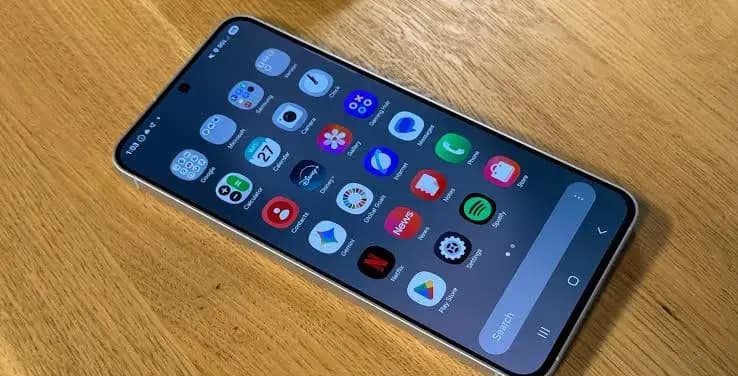
Google Messages pinned chats may automatically switch layouts based on conversation count

Google Messages pinned chats may soon swap between tile and list views depending on how many conversations users pin, according to beta code.
By Luiza Mosneagu
Samsung phone app reportedly adding spoofed call detection from Pixel devices
AppsNov 18, 2026

Samsung phone app reportedly adding spoofed call detection from Pixel devices

Samsung is reportedly developing spoofed call detection for its phone app, using RCS to flag faked contact numbers, possibly debuting in One UI 9.5.
By Cristian Penisoara
Google Photos duplicates will stop with an upcoming image editing update
AppsNov 17, 2026

Google Photos duplicates will stop with an upcoming image editing update

Google Photos duplicates will stop appearing after edits under an upcoming update for Android 11 and newer, though a release date has not been set.

By Robert Haba
Next in queue

Read the next article

The next story loads as you reach the end. You can also load it using the button.

Comments & Discussions

Join the conversation! We use Disqus to handle comments. Click the button below to load the comment section.