Skip to content
Droid ToolsDroid Tools
Home
About UsContact
Editorial PolicyReview Policy
Privacy PolicyCookie PolicyTerms & Conditions
⌘K
Search
FacebookX (Twitter)InstagramThreadsBlueskyTikTokYouTubeRedditTelegramRSS Feed
Droid Tools

Droid Tools covers the latest Android news, device reviews, app updates, and OS guides. Stay informed with hands-on coverage from mobile tech experts.

Explore

  • News
  • Apps
  • OS
  • Phones
  • Reviews

Legal & Info

  • About Us
  • Contact
  • Editorial Policy
  • Review Policy
  • Privacy Policy
  • Terms & Conditions
  • Cookie Policy
  • Affiliate Disclosure
  • Disclaimer
  • HTML Sitemap
  • XML Sitemap
© 2026 Droid Tools. All rights reserved.
Home/Apps/Android 17 QPR2 App lock arrives in Beta 3 for Pixel
Apps

Android 17 QPR2 App lock arrives in Beta 3 for Pixel

android 17
Robert Haba
Aug 17, 20261 min read
Robert Haba
Robert Haba
Founder · Editor-in-Chief
Robert Haba is the founder and editor-in-chief of Droid Tools. A lifelong gadget enthusiast with over a decade following the Android ecosystem, he built this publication to cut through the noise and give readers honest, real-world coverage of the tech they actually use.
X
Profile →
0%
Share on XFacebookBluesky
Follow on Google
Trust this source on GoogleAlways see our reviews and tech guides first in search results
Add trusted source

Android 17 QPR2 App lock is arriving as a native Pixel feature in Beta 3, according to 9to5Google. The addition sits alongside the release’s visual changes, and the finished QPR2 update is scheduled for December.

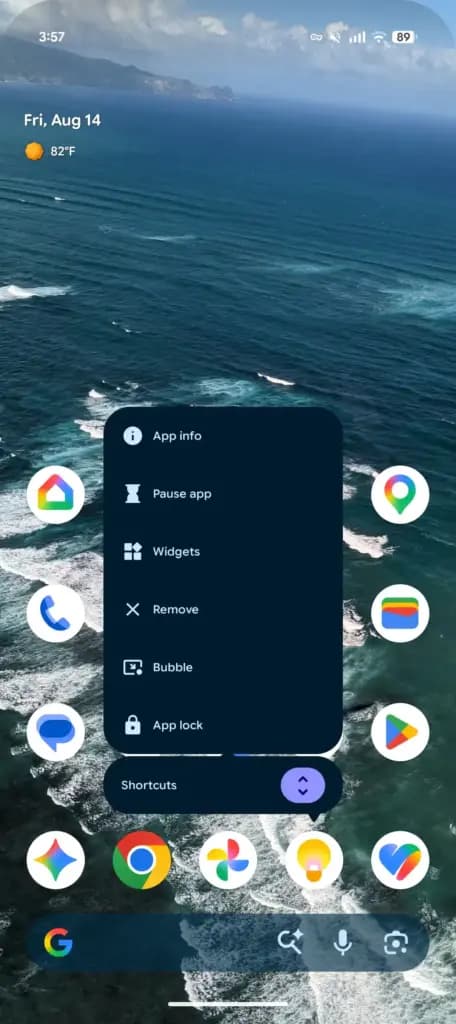
Long-pressing an app opens the Actions menu, where “App lock” appears at the bottom alongside App info, Pause app, Widgets, Remove, and Bubble. Selecting it brings up the system authentication sheet, requiring Fingerprint Unlock or a PIN before the app opens.

Google says locking an app will:
  • hide notification content;
  • remove its widgets and shortcuts; and
  • continue allowing permitted AI agents and services to access the app’s data.
Android 17 QPR2 Beta 3 app lock
Gallery photo 2

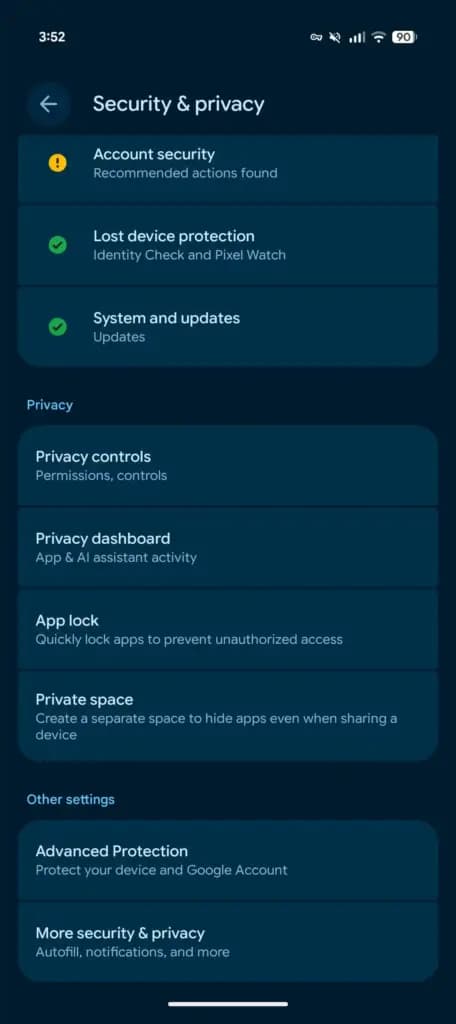
Users can manage every locked app from Settings > Security & privacy > App lock, where entries can be added or disabled quickly.

Trust this source on GoogleAlways see our reviews and tech guides first in search results
Add trusted source
Tags:#android#android17#app#lock#QPR2#update
Recommended Deals
1 / 5
Google Pixel Watch 5 (45mm)

Google Pixel Watch 5 (45mm)

5.0
$459.99$529.99-13%
Buy on Amazon
* As an Amazon Associate, Droid Tools earns from qualifying purchases. Read our editorial policy
Robert Haba
Robert HabaFounder · Editor-in-Chief
X

Robert Haba is the founder and editor-in-chief of Droid Tools. A lifelong gadget enthusiast with over a decade following the Android ecosystem, he built this publication to cut through the noise and give readers honest, real-world coverage of the tech they actually use.

Next Story in Apps

Google rolls out new Android scam protections and Messages upgrades

Google is introducing new Android scam protections, including Enhanced Protection in Messages, call-forwarding warnings, and screen-share privacy defenses.

→

Latest Stories

google pixel 1101

Pixel 11 in a nutshell: a great phone that gives you little reason to upgrade

02

How Quick Share for Windows connects Android phones directly to PCs

03

Android Auto redesign hints emerge in version 18.0 beta

04

WhatsApp message scheduling spotted in Android beta build

Amazon Deals
5.0
Google Pixel Watch 5 (45mm)

Google Pixel Watch 5 (45mm)

Best Price
$459.99$529.99-13%
Buy

Top Deals

Pixel 11 in a nutshell: a great phone that gives you little reason to upgrade

Deal
Pixel 11 in a nutshell: a great phone that gives you little reason to upgrade

Google sends 30% Pixel 11 discount code to select AI Pro subscribers

Deal
Google sends 30% Pixel 11 discount code to select AI Pro subscribers

Galaxy Watch 7 deal: get the Wear OS watch for $159 at Amazon

Deal
Galaxy Watch 7 deal: get the Wear OS watch for $159 at Amazon
Recommended stories

Continue reading

More from this category →
google messeges scam detection
AppsOct 15, 2026

Google rolls out new Android scam protections and Messages upgrades

Google is introducing new Android scam protections, including Enhanced Protection in Messages, call-forwarding warnings, and screen-share privacy defenses.

By Cristian Penisoara
Google Messages rcs
AppsOct 7, 2026

Google Messages may remove the SMS/MMS-only toggle for RCS chats

Rich Communication Services (RCS) has reshaped Google Messages, bringing read receipts, larger media attachments, and cross-platform messaging with iPhone users. RCS isn't without its own issues, though, and Messages has so far offered an easy way to opt out on a per-chat basis if it causes problems - a feature that now looks like it […]

By Robert Haba
ai video generator
AppsOct 1, 2026

6 Best AI Video Generators for Creators and Teams in 2026

AI video generation has moved well beyond experimental clips. In 2026, creators, marketing teams, agencies, and video professionals can use these tools for social content, product videos, storyboards, advertisements, B-roll, explainers, and early-stage creative concepts. The challenge is choosing the right platform. Some focus on cinematic generation, while others are better for rapid marketing production […]

By Robert Haba
Google Messages rolls out Keep Notes integration from the September Android Drop
AppsSep 24, 2026

Google Messages rolls out Keep Notes integration from the September Android Drop

Google Messages is now widely rolling out its new Keep Notes integration, following last week's September 2026 Android Drop announcement. Opening the “plus” menu inside a conversation reveals a new Keep Notes shortcut, and those pills can be reordered like usual. Alternatively, Google might surface a contextual “Create list” shortcut directly in the suggestions row. […]

By Robert Haba
Next in queue

Read the next article

The next story loads as you reach the end. You can also load it using the button.

Comments & Discussions

Join the conversation! We use Disqus to handle comments. Click the button below to load the comment section.