Skip to content
Droid ToolsDroid Tools
Home

Explore

  • News
    427
  • OS
    264
  • Apps
    230
  • Phones
    190
  • Guides
    175
  • Wearables
    104
  • Reviews
    16

Latest Articles

  • Samsung sleep apnea detection expands to Galaxy Ring and Galaxy Watch
    Wearables

    Samsung sleep apnea detection expands to Galaxy Ring and Galaxy Watch

  • Google Photos RAW images could soon get a dedicated section in Collections
    Apps

    Google Photos RAW images could soon get a dedicated section in Collections

  • One UI 9.5 beta firmware surfaces for Galaxy S26 Ultra as beta program nears
    News

    One UI 9.5 beta firmware surfaces for Galaxy S26 Ultra as beta program nears

  • Google Messages pinned chats redesign rolls out to beta users
    Apps

    Google Messages pinned chats redesign rolls out to beta users

  • Silicon-carbon batteries deliver huge capacity, but charging speeds have slowed down
    News

    Silicon-carbon batteries deliver huge capacity, but charging speeds have slowed down

Live Offers

Deal Alerts

Browse reported discounts on phones, wearables, and accessories. Check the retailer for the current price and availability.

View All Deals

Latest Deal Alerts

  • Sony WF-1000XM6 earbuds drop to $238 in limited B&H Photo Video discount
    🔥 Offer

    Sony WF-1000XM6 earbuds drop to $238 in limited B&H Photo Video discount

  • Walmart cuts iVANKY ultra-slim magnetic power bank to $15 in 50% discount
    🔥 Offer

    Walmart cuts iVANKY ultra-slim magnetic power bank to $15 in 50% discount

  • 🔥 Offer

    Amazon offers $749 Pixel 10 Pro XL deal as memory prices climb

  • Moto Tag 2 price increases to $29.99 as introductory discount ends
    🔥 Offer

    Moto Tag 2 price increases to $29.99 as introductory discount ends

  • Samsung Galaxy S26 discounts continue on Amazon after October Prime Day
    🔥 Offer

    Samsung Galaxy S26 discounts continue on Amazon after October Prime Day

About UsContact
Editorial PolicyReview Policy
Privacy PolicyCookie PolicyTerms & Conditions
⌘K
Search
Official Channels10 Profiles
FacebookX (Twitter)InstagramThreadsLinkedInBlueskyTikTokTelegramMastodonRSS Feed
Droid Tools

Droid Tools covers the latest Android news, device reviews, app updates, and OS guides. Stay informed with hands-on coverage from mobile tech experts.

Explore

  • News
  • Phones
  • Apps
  • Android OS
  • Wearables
  • Guides
  • Reviews
  • Deals

Legal & Info

  • About Us
  • Contact
  • Editorial Policy
  • Review Policy
  • Privacy Policy
  • Terms & Conditions
  • Cookie Policy
  • Affiliate Disclosure
  • Disclaimer
  • HTML Sitemap
© 2026 Droid Tools. All rights reserved.
Home/Apps/Google Photos RAW images could soon get a dedicated section in Collections
Apps
•google

Google Photos RAW images could soon get a dedicated section in Collections

Google is developing a dedicated RAW images section in Google Photos' Collections tab. The unreleased shortcut gathers backed-up RAW photos in one place, making them easier to locate for editing or to delete to free up Google account storage.

Luiza Mosneagu• Reviews Editor · Tech Writer
Nov 7, 2026•2 min read
Google Photos RAW images could soon get a dedicated section in Collections
0%
Share on XFacebookBluesky
Follow on Google
Trust this source on GoogleAlways see our reviews and tech guides first in search results
Add trusted source

Finding and managing RAW photos in Google Photos could soon become easier. Code in the latest Google Photos app update (v8.0) indicates that Google is working on a dedicated “RAW images” section for the Collections tab. The addition would display backed-up RAW photos in a single location. Most Android phones can shoot RAW photos right out of the box, but the large files quickly consume Google account storage and can be difficult to locate in the app for editing. Google appears to be working to address both issues.

Current storage and navigation hurdles

Shooting in RAW improves image quality and provides greater control during editing, but the files require substantial space. As a result, RAW images quickly eat into Google account storage limits. Finding specific RAW pictures in the app is also difficult. Google Photos currently displays RAW photos in the main photo grid with a small “RAW” badge in the corner. This makes them hard to distinguish from regular JPEGs, complicating efforts to find them for editing or to delete them to free up storage space.
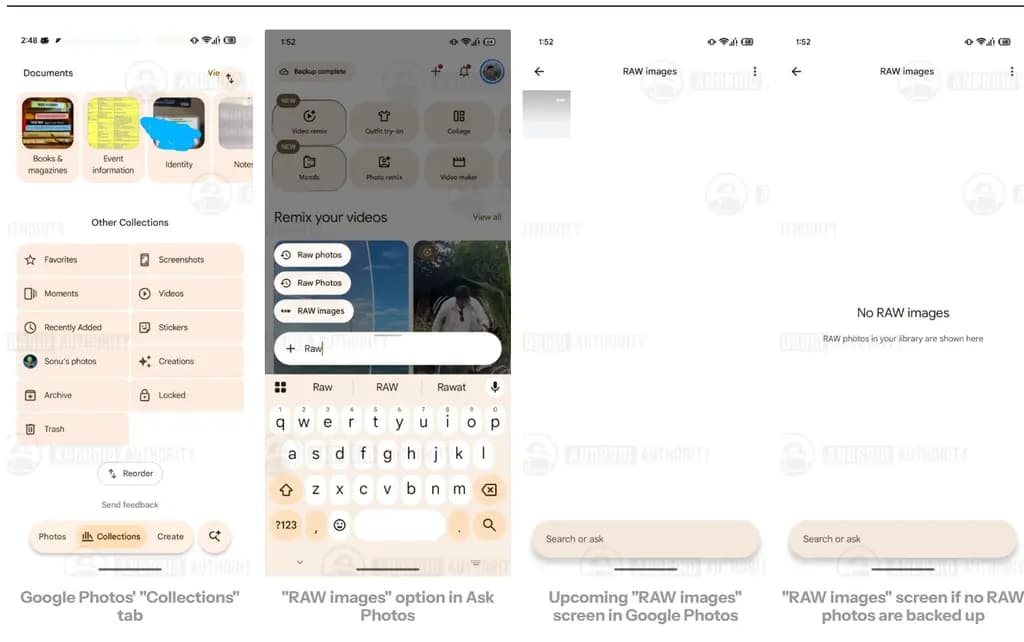
Image source: Android Authority

Dedicated RAW images section spotted in code

Code found in the Google Photos version 8.0 update indicates that Google could add a dedicated “RAW images” section to the Collections tab in a future release. While Android Authority could not make the option appear directly in Collections, they surfaced it through Ask Photos after some tinkering. The user interface remains a work in progress. When opened, the section displays all backed-up RAW images in one place. If an account has no backed-up RAW files, the screen simply reads: “No RAW images.”

The shortcut serves multiple purposes. It allows users to delete unwanted files to recover storage space, and it helps them quickly locate RAW shots to jump straight into editing without hunting through the main grid first. The feature is not currently live, and Google is still refining it, though the underlying filter already works as expected.

Via:Android Authority
Trust this source on GoogleAlways see our reviews and tech guides first in search results
Add trusted source
Tags:google#photos#pictures#raw#storage#update
Recommended Deals
1 / 9
Samsung Galaxy Watch 8

Samsung Galaxy Watch 8

4.9
$289.99$349.99-17%
Buy on Amazon
* As an Amazon Associate, Droid Tools earns from qualifying purchases. Read our editorial policy
Luiza Mosneagu
Luiza MosneaguReviews Editor · Tech Writer

Luiza Mosneagu is Reviews Editor at Droid Tools. A psychologist by training and tech writer by passion, she has tested over 60 Android devices since 2020 - always for a minimum of two weeks before writing a word. Her focus is camera quality, everyday usability, and cutting through marketing claims to tell you what a device is actually like to live with.

Next Story in Apps

Google Messages pinned chats redesign rolls out to beta users

Google Messages pinned chats are receiving an updated layout with large contact photos in beta, alongside a new floating search button.

→

Latest Stories

Huawei Nova 17 series leak points to 200MP camera and Kirin 8 chip01

Huawei Nova 17 series leak points to 200MP camera and Kirin 8 chip

02

Sony releases Xperia 10 Android 17 update with missing flagship features

03

GrapheneOS brings Linux 6.18 kernel to Pixel 10 series and eyes Pixel 11 support

04

Samsung sleep apnea detection expands to Galaxy Ring and Galaxy Watch

Recommended Deal
-13% OFF
Google Pixel Watch 5 (45mm)

Google Pixel Watch 5 (45mm)

5.0(1,771 reviews)
$459.99$529.99
Buy on Amazon

* As an Amazon Associate, Droid Tools earns from qualifying purchases.

Top Deals

Sony WF-1000XM6 earbuds drop to $238 in limited B&H Photo Video discount

Deal
Sony WF-1000XM6 earbuds drop to $238 in limited B&H Photo Video discount

Walmart cuts iVANKY ultra-slim magnetic power bank to $15 in 50% discount

Deal
Walmart cuts iVANKY ultra-slim magnetic power bank to $15 in 50% discount

Amazon offers $749 Pixel 10 Pro XL deal as memory prices climb

Deal

Continue reading

More from this category →
Google Messages pinned chats redesign rolls out to beta users
AppsNov 6, 2026

Google Messages pinned chats redesign rolls out to beta users

Google Messages pinned chats are receiving an updated layout with large contact photos in beta, alongside a new floating search button.

By Cristian Penisoara
Google gradient icon redesign rolls out to Phone and Contacts apps
AppsNov 4, 2026

Google gradient icon redesign rolls out to Phone and Contacts apps

Google is rolling out gradient icon redesigns to Phone and Contacts apps, with subtle gradients and cleaner edges across mobile and web platforms.

By Luiza Mosneagu
Circle To Search
AppsNov 2, 2026

Google adds Circle to Search in Google Messages to identify scam texts

Circle to Search in Google Messages helps identify suspicious texts on supported Android phones, offering guidance on potential scams and next steps.

By Cristian Penisoara
google messeges scam protection
AppsOct 27, 2026

Google Messages Enhanced Protection rolls out to combat conversational scams

Google Messages Enhanced Protection adds Gemini scam analysis and on-device link checks for select Android phones as beta testing begins gradual rollout.

By Luiza Mosneagu
Next in queue

Read the next article

The next story loads as you reach the end. You can also load it using the button.

Comments & Discussions

Join the conversation! We use Disqus to handle comments. Click the button below to load the comment section.