Blog

  • 6 Useful Tips to Secure Your Android Device

    6 Useful Tips to Secure Your Android Device

    Russia has been invading Ukraine for over a month, and concerns about cybersecurity are growing. Even before the invasion, US officials blamed Russia for cyberattacks on Ukraine’s Ministry of Defense and two banks.

    While the US Cybersecurity and Infrastructure Security Agency has stated that there are no particular or credible cyberthreats aimed at the US, it has also stated that hypothetical cyberattacks are more likely to target infrastructure. CISA advises that everyone be ready in case something goes wrong. When it comes to cyberdefense, safeguarding your mobile device is a smart place to start. Here are six things Android users may do to keep their data safe.

    Always update you OS

    Updating your operating system can resolve issues and repair known security risks. If you don’t update to the current version, you and your device are vulnerable to security weaknesses that could expose sensitive information to unscrupulous actors. Some individuals put off updating their operating system to avoid dealing with early glitches, but waiting too long can destroy your PC. Here’s all you need to know about Android 12.

    Use two-factor authentication

    In the event that your password is compromised, two-factor authentication, or 2FA, adds a second layer of security to your Android account. When you use 2FA, a second message is sent to another device after you enter your password, requesting you to confirm that you are trying to log in. It takes a little longer to log in, but the added degree of protection is well worth it. Here’s how to enable two-factor authentication.

    Password manager

    A password manager can assist you if you’re having problems remembering several passwords and creating unique passwords for each account. These tools can be used in conjunction with 2FA to securely store passwords and fill login pages automatically. They can also protect you from phishing schemes, which ask you to input your password on a phony website. Check out CNET’s reviews of password managers Bitwarden, LastPass, and 1Password for additional information.

    Encrypt your device

    Beginning in 2015, Google mandated that all Android smartphones be encrypted out of the box. After your device has been encrypted, every data saved on it is protected by a PIN number, fingerprint, pattern, or password that only the owner knows. Even Google won’t be able to unlock your device without the key. You may learn how to encrypt your phone here.

    Remove data from Google

    Because Android is a Google product, unencrypted device data may end up on a Google server. You can check with Google to see what data it has about you and request that it be deleted. It’ll take some time, but it’ll be worth it because your information can’t be stolen if it’s not in the system to begin with. Here’s how you ask Google to remove your data, but keep in mind that Google does not guarantee that it will comply with your request.

    Last option – reset/delete your phone

    You can remotely wipe your phone if you lose it or it is stolen. If you need to do this, our Android settings guide includes a walkthrough. Because this deletes all data from your phone, you should make a habit of backing it up on a second device if you have anything important on it.


    For more information on securing your phone, check out these eight apps to protect your phone’s privacy, what information digital security experts wish you knew and how to stop your phone from tracking you.
  • DMs on Instagram get better on last update

    DMs on Instagram get better on last update

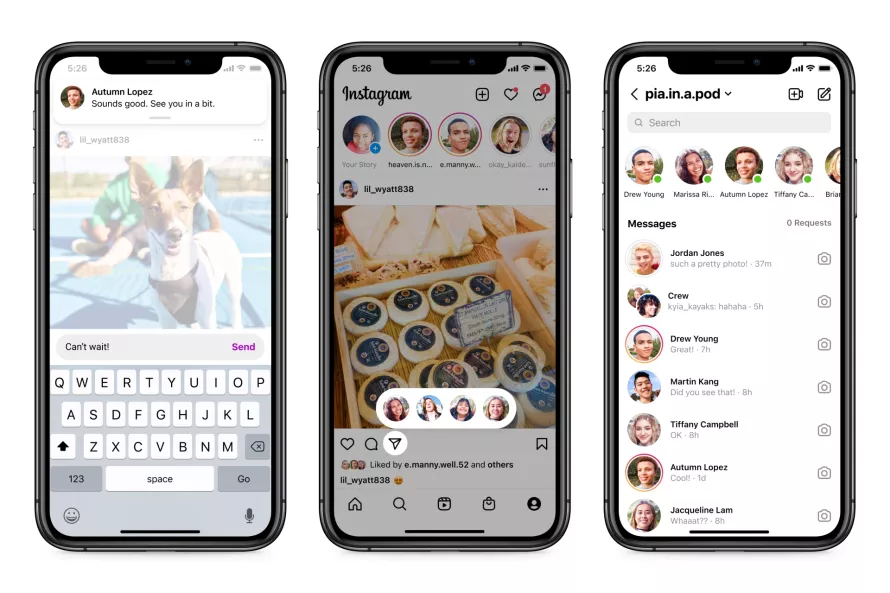
    Meta is delivering a plethora of new capabilities for Instagram, after major messaging enhancements for WhatsApp and Messanger. The new features will make it easy to share content and respond to conversations from anywhere.

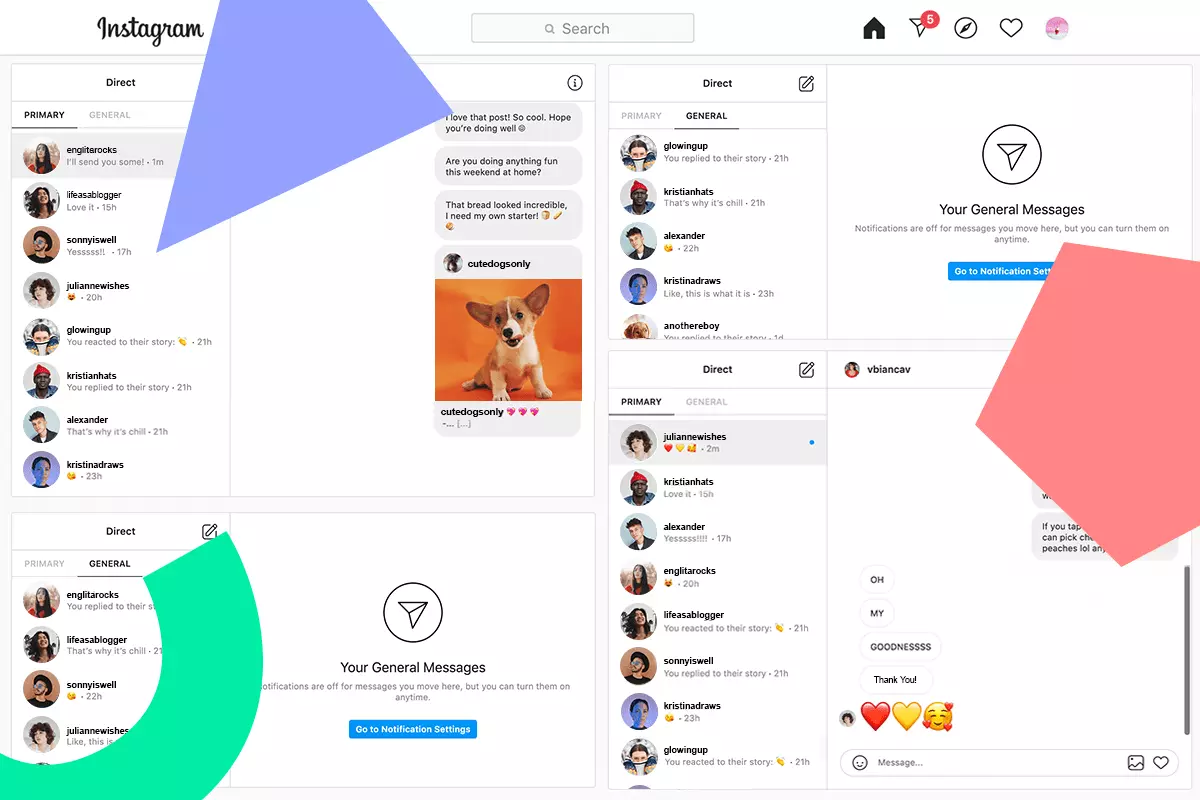
    The option to respond to fresh messages while browsing Instagram DMs is a welcome addition. Instead of disrupting your surfing activity, users will receive a new in-app notice that will allow them to respond quickly without having to go to the inbox.

    Additionally, you may now share a post more quickly by hitting and holding the “send” button when you locate one you wish to share. This will bring up a list of “your closest friends” with whom you may instantly share the post — all while continuing to browse. If you’re in your inbox, Meta is showing how a row at the top of your inbox — similar to Messenger — will show you who is online and accessible to speak.

    In addition, Meta is bringing a new function to Instagram that was previously only available on Messenger. Silent messages allow you to communicate your friends without causing them to receive a notification, which is very useful if you’re sending a message late at night or simply don’t want to bother them.

    instagram dm

    In a nod to Messenger, Instagram is also adding a new lo-fi chat style and the ability to post votes in group messaging.

    Thanks to integrations with some of the top music streaming services like Spotify, Amazon Music, and Apple Music, users will soon be able to share previews of their favorite tunes. Users will be able to listen to up to 30 seconds of a song immediately in the chat, which could be useful for music discovery.

    These enhancements come only one day after Meta revealed a raft of improvements to WhatsApp’s voice messaging feature, demonstrating that the firm is on a roll with new features to improve its messaging apps. Instagram’s new features are now being rolled out in “certain countries,” with intentions to expand them globally in the near future.

    These enhancements come only one day after Meta revealed a raft of improvements to WhatsApp’s voice messaging feature, demonstrating that the firm is on a roll with new features to improve its messaging apps. Instagram’s new features are now being rolled out in “certain countries,” with intentions to expand them globally in the near future.

  • Google Pixel 6 and 6 Pro deals in late March 2022

    Google Pixel 6 and 6 Pro deals in late March 2022

    Look no further if you’re looking for the best Google Pixel 6 prices or the most intriguing Google Pixel 6 Pro bargains. We’ve compiled all of the finest Google Pixel 6 deals so you can concentrate on picking your new favorite gadget.

    Trading in your old device is a quick and easy method to save money, but if you’re willing to switch carriers or add a new line, there are also some good options. The offers roundup can be found at the bottom of this page, but first, let’s discuss the devices.

    The Pixel 6 and Pixel 6 Pro have made waves as powerful and affordable alternatives to Samsung and Apple handsets since their arrival last autumn, but that wasn’t always the case. Previous incarnations of the smartphone were tarnished by software issues, unimaginative design, and poor battery performance, as we mentioned in our review of the Google Pixel 6. For years, the world pondered whether Google would ever change its mind and produce a high-end flagship smartphone.

    Thankfully, with the Pixel 6 lineup, Google has finally delivered. The two Pixel 6 devices have wowed users with their advanced 50MP rear cameras and the introduction of the ‘Tensor’, Google’s very first in-house chipset. In fact, we went so far as to select the Pixel 6 and the Pixel 6 Pro as two of the best Android phones that you can buy right now. 

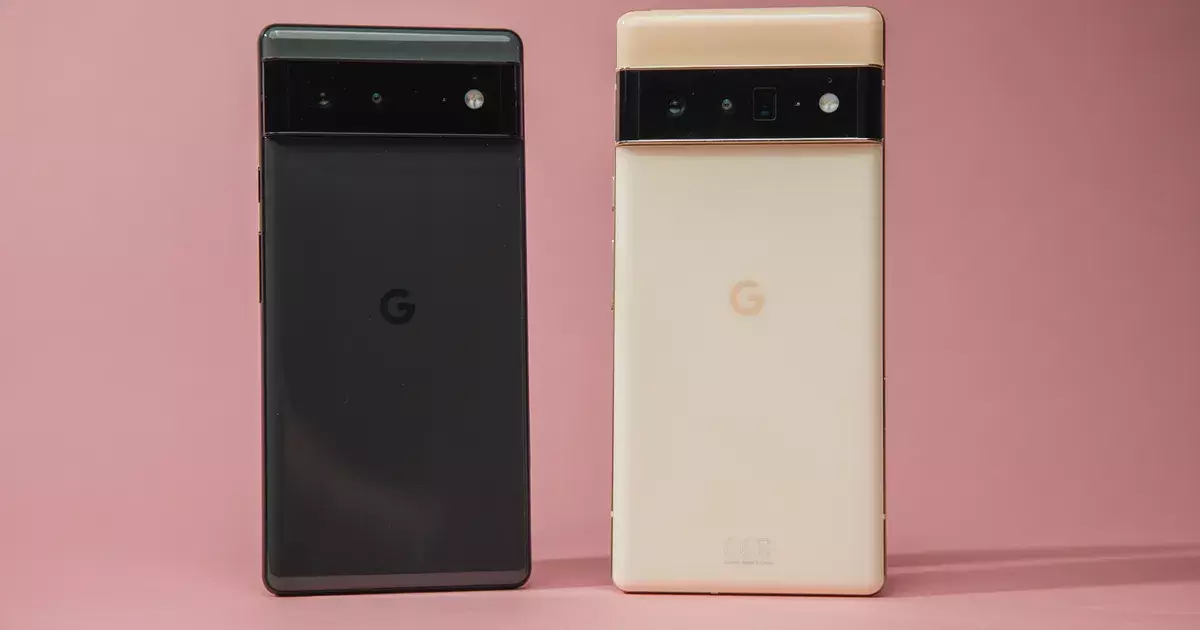
    The Google Pixel 6 has a beautiful 6.4-inch AMOLED display with a 90Hz refresh rate, and with a starting price of under $600, you’re paying much less than you would for a similar phone like the Samsung Galaxy S21. 

    The Pixel 6 Pro takes things even further, with a large 6.7-inch display, improved battery life, 12GB of RAM (compared to 8GB with the Pixel 6), and rounded edges for an elegant look. With a starting price of $899 for the 128GB version, it’s not quite as affordable as the Pixel 6, but you’re still getting a great value when you compare this device to non-Google competitors. 

    Although the rates are low, new discounts are always being added. We can move on to the discounts of the month now that you know a little more about the Pixel 6 series. We’ll start with some Google Pixel 6 bargains before moving on to Pixel 6 Pro deals.

    If you’re still not convinced, check out our Pixel 6 and Pixel 6 Pro buying guides to learn more about the smartphones’ flaws and merits, as well as to see how their cutting-edge cameras perform.

    GOOGLE PIXEL 6 DEALS

    Google Pixel 6

    Google Pixel 6 $699.99 FREE with eligible data plans

    Coming in at the top of our list is this very generous offer from Verizon. Sign up for a new line with an unlimited data plan, and the wireless carrier will basically hand over a new Google Pixel 6 at no cost to you and no trade-ins necessary. 

    Naturally, this deal will appeal the most to people who need a new phone line, but it’s an impressive offer nonetheless. If you’re a brand new Verizon subscriber who just switched, check to see if you’re eligible to receive a $1,000 gift card. VIEW DEAL

    Google Pixel 6 $599.99 with 0% APR over 24 months

    Google Pixel 6 $599.99 with 0% APR over 24 months

    Buy the unlocked phone directly from the Google Store and you can get 0% interest if you pay over 24 months (that’s a monthly payment of $24.96). If you’re interested in Google Store Financing, the company is also offering a $100 statement credit for a limited time. VIEW DEAL

    Save up to $800 with eligible trade-in and data plan

    Save up to $800 with eligible trade-in and data plan

    AT&T is offering some huge savings if you’re able to meet the requirements. Sign up for an unlimited data plan, trade in your old device, and receive up to $800 in credits over 36 months (the entire cost of a Google Pixel 6). There is a lot of fine print associated with this deal, but the value is huge if you can make it work. 

    This deal is also available for the Google Pixel 6 Pro.VIEW DEAL

    FREE $100 virtual gift card when you switch to Visible

    FREE $100 virtual gift card when you switch to Visible

    This offer simply gives you a $100 gift card after three months if you buy a Google Pixel 6 and switch to Visible from another wireless carrier. The deal is good whether you buy the phone upfront or pay over 24 months (with 0% APR). 

    This deal is also available for the Google Pixel 6 Pro.VIEW DEAL

    Get a Pixel 6 for only $99 when you add a line

    Get a Pixel 6 for only $99 when you add a line

    If you buy a new Google Pixel 6 and add one of their eligible lines, T-Mobile will give you $500.99 over two years in the form of monthly credits, bringing the price of the phone down to $99 with no trade-in required. VIEW DEAL

  • #beta – Paranoid Android Sapphire available for the OnePlus 9 and OnePlus 9 Pro

    #beta – Paranoid Android Sapphire available for the OnePlus 9 and OnePlus 9 Pro

    The first beta build of the Paranoid Android Sapphire ROM for the OnePlus 9 and OnePlus 9 Pro has just been released by the Paranoid Android team. For quite some time, an Alpha version of the Android 12 based ROM has been available for both phones. The new beta version, on the other hand, offers a more stable software experience.

    The Paranoid Android Sapphire Beta is now available for the OnePlus 9 and OnePlus 9 Pro, as announced by XDA Recognized Developer arter97. Several device-specific enhancements are included in the latest build, including redesigned blobs, improved sleep mode, fingerprint scanner improvements, and a transition to arter97’s kernel. Repainter integration, improvements from ProtonAOSP, a burn-in protection feature for devices with OLED panels, the latest f2fs tools, and more have all been added to the Paranoid Android platform.

    Paranoid Android Sapphire available for the OnePlus 9 and OnePlus 9 Pro

    The beta release still has a few known faults. These include delayed mobile data activation after reboot, Wi-Fi not working after a few reboots, and less-than-ideal pocket recognition, which can wake up the smartphone or activate gestures by accident.

    If you wish to try out the Paranoid Android Sapphire Beta on your OnePlus 9/Pro, head over to the forum mentioned below. It includes a download link for the ROM as well as step-by-step instructions for flashing it. Although the beta build can be flashed onto a current Sapphire Alpha system, the developer recommends “a clean flash.”

    Download Paranoid Android Sapphire Beta for the OnePlus 9 / OnePlus 9 Pro

    Full update changelog:

    Here are some device-specific highlights:

    • Prebuilt blobs are revamped to fix various issues (audio, video, NFC, etc)
    • Sleep mode is changed to fix excessive idle battery drain
    • VRR implementation is now working, which will improve battery life a lot
    • Corner masks are now done properly
    • Fingerprint improvements
    • Kernel switched to a customized version of arter97 kernel

    Here are platform-wise highlights:

    • Latest CAF tag merged
    • kdrag0n’s Repainter service integrated
    • Optimized bionic, memory routines (ported by xboxfanj)
    • Latest f2fs-tools
    • Few optimizations merged from kdrag0n’s ProtonAOSP
    • Burn-in protection feature added

    Device issues

    • Mobile network will initialize a bit slowly after boot
    • Wi-Fi may not work on a few reboots. You may have to reboot multiple times for Wi-Fi to work
    • Pocket-detection is less than ideal, it may result in accidental wake-ups or ignored gestures
    • Bootanimation will pause for a split second. This is a known issue from the kernel


    There are likely many other issues, these are just the most prominent to me. Don’t come into this with the expectation any issue you come across will be fixed in a timely manner.

    Requirements


    Make sure you are coming from any Android 11 based OxygenOS build, stable is recommended.

    Downloads

    You can always get our Alpha builds from ourTelegram Group or directly download them from here:
    OnePlus 9 Pro – Beta 1
    (Note, OP9 & Pro builds are no longer unified)

    Note: Custom kernels are not supported unless the kernel says it supports AOSPA and GMS is included!

    How to install

    1. Download the latest fastboot zip we released (hint: it has an -img appended to zip name)
    2. Reboot to bootloader.
    3. Wipe userdata with the command “fastboot -w”
    4. Flash the fastboot zip with “fastboot update aospa-*-image.zip”
    5. Reboot.

    Changelog

    • Prebuilt blobs are revamped to fix various issues (audio, video, NFC, etc)
    • Sleep mode is changed to fix excessive idle battery drain
    • VRR implementation is now working, which will improve battery life a lot
    • Corner masks are now done properly
    • Fingerprint improvements
    • Kernel switched to a customized version of arter97 kernel

    Here are platform-wise highlights:

    • Latest CAF tag merged
    • kdrag0n’s Repainter service integrated
    • Optimized bionic, memory routines (ported by xboxfanj)
    • Latest f2fs-tools
    • Few optimizations merged from kdrag0n’s ProtonAOSP
    • Burn-in protection feature added

    Starting with Beta 1, you must clean flash due to recent commits related to userdata.

    Important / Useful links
    Paranoid Android Twitter
    Paranoid Android Channel (Telegram)
    Paranoid Android Community (Telegram)
    Paranoid Android OnePlus 9 Family (Telegram

  • Stable Android 12 update for the ROG Phone 5 and ROG Phone 5S are live

    Stable Android 12 update for the ROG Phone 5 and ROG Phone 5S are live

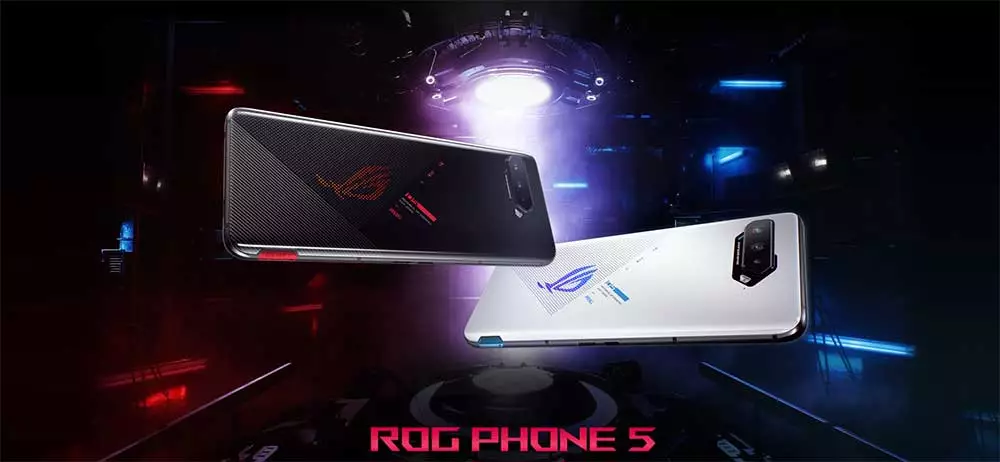
    Following the release of a solid Android 12 update for the ZenFone 8 in December, ASUS is now bringing Android 12 update to two more of its phones: the ROG Phone 5 and ROG Phone 5S. ASUS has previously stated that both phones would be updated to Android 12 in Q1 2022, and the firm is following through on that promise.

    ASUS has begun pushing out a stable Android 12 upgrade to the ROG Phone 5 and ROG Phone 5S, according to announcements on ZenTalk forums. All of Android 12’s notable features are included, including a revised Quick Settings panel and volume selector, Privacy Dashboard, camera, microphone, and location indications, and redesigned home screen widgets.

    On top of that, users can also look forward to ASUS’s own additions, such as a redesigned ROG UI, revamped system apps, improved One-handed mode, new splash screen animations, a dual control feature for AirTriggers, and more.

    asus rog phone  android update

    Download Android 12 stable update

    The Android 12 update for the ROG Phone 5 carries software version 31.0810.1226.57 and weighs around 3.4GB. M

    The Android 12 update for the ROG Phone 5 carries software version 31.0810.1226.57 and weighs around 3.4GB. Meanwhile, the ROG Phone 5S update bumps the software version to 31.0810.1226.57. The automatic OTA rollout has already started. If you want to skip the queue, ASUS has also provided direct download links to help you manually install the update.

    Download Android 12 update for the ROG Phone 5

    Download Android 12 update for ROG Phone 5S

    The official update changelog is as follows:

    • Please back up your data before upgrading to Android 12. If you want to downgrade the software version to Android 11 using the official software package, it will erase all data from your device.
    • Upgraded system to Android 12
    • Introduced new ROG UI design
    • Revamped Mobile Manager, Contacts, Phone, File Manager, Calculator, Clock, Gallery, Weather, Sound recorder, Settings, Data Transfer, Local backup, Setup wizard and System update apps
    • Merge Wi-Fi and mobile network settings to Internet settings
    • Added extra dim setting, the Drones of Detection theme pack, and AirTriggers’ dual control feature
    • Adjusted Quick Settings panel, notification tray, and volume panel to Android 12 design
    • Adjusted the Classic style of the power menu to match Android 12 design. Separated device control and Wallet to independent pages.
    • Added the Shortcut option in the Security & lock screen settings menu
    • Added privacy dashboard, camera and microphone indicators, show clipboard access, approximate location access, and microphone access features
    • Replaced ASUS Safeguard with Android 12 Emergency SOS
    • One-handed mode integrates Android 12 design and supports more options.
    • Removed search option in OptiFlex setting
    • Introduced a new widget page design in Launcher. Adjusted the position of the screenshot option and removed the hotseat app icons in the Overview page.
    • Added the Swipe to invoke assistant option to Gesture settings
    • Removed the Quick Settings layout option from Display settings
    • Added splash screen animations when launching apps
    • ASUS Phone removed SIP calling support as Android 12 does not natively support SIP calling
    • Added the “Draw overlay permission request” dialog when launching Game Genie for the first time
    • Removed the function of swiping up from any position of Launcher, holding, and releasing to enter the Overview page when using gesture navigation
    • Added the function of going back to the main screen in Launcher by swiping up from the bottom when using gesture navigation
    • Added the “Convert videos to AVC” option in the USB preferences page
    • Some third party apps are not compatible with Android 12 yet
    • Modified the color of the icons in the 1st-layer Settings to Android 12 black and white design

    Did you update?

  • The Galaxy S22+ alternative – OPPO Find X5 Pro

    The Galaxy S22+ alternative – OPPO Find X5 Pro

    In 2022, we’ve already seen a lot of fantastic phones. The Galaxy S22+ is a terrific all-around phone, while the S22 Ultra marks the return of the Note series and the S21 FE establishes a new benchmark for budget flagships.

    This year, Samsung fired the initial shot, but Chinese makers aren’t far behind. I’m excited to watch what OPPO does this year; the brand’s Find and Reno series have seen a 50 percent year-over-year rise in sales in the previous 12 months, and it’s gaining traction in major western markets like the UK.

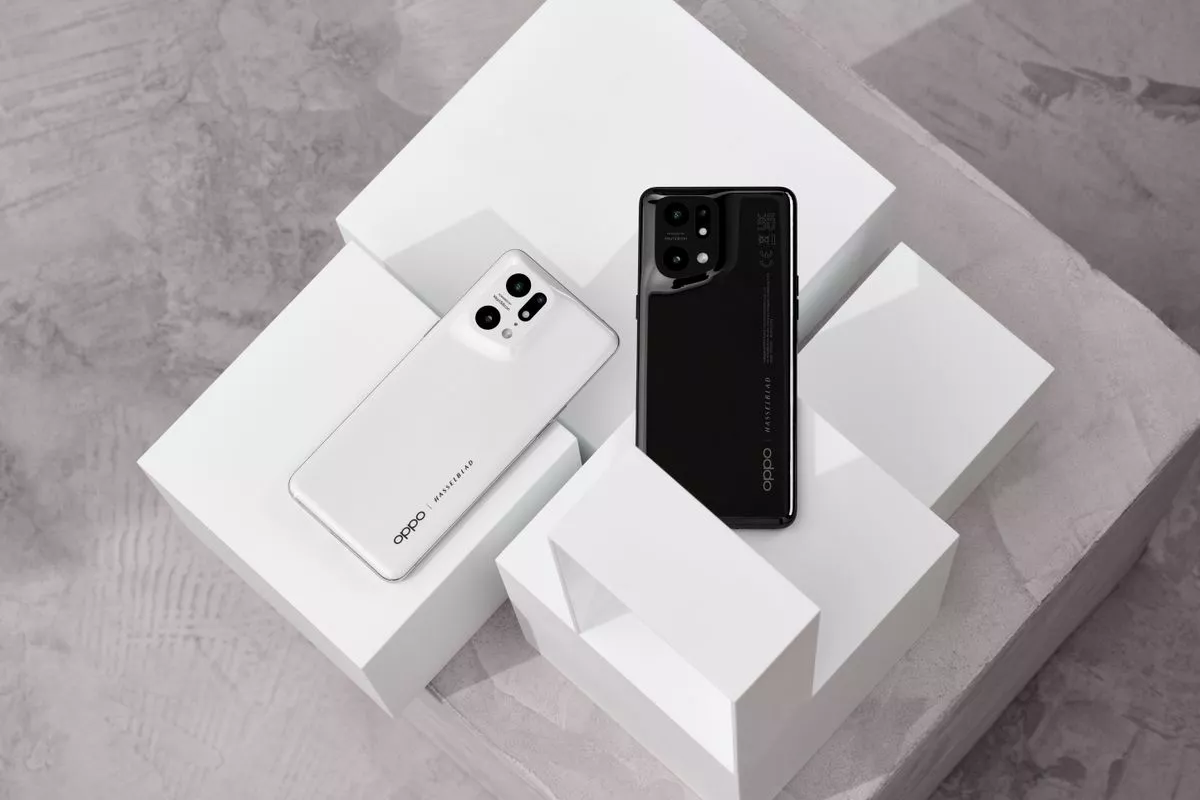
    With this year’s Find X5 Pro, OPPO hopes to continue that trend. The phone, which is aimed squarely at the Galaxy S22+, is now available in global markets. It has a similar look to the Find X3 Pro from last year, but it has a number of intriguing new features under the hood, including OPPO’s in-house image NPU, the MariSilicon X. There’s also a Hasselblad connection, improved internals, and new charging technology that supports up to 80W wired and 50W wireless charging.

    oppo find x5 pro

    Does the Find X5 Pro have what it takes to compete with Samsung’s best? With the Galaxy S22+ giving a solid overall package, does the Find X5 Pro have what it takes to go up against the best? Let’s have a look.

    Release

    The Find X5 Pro was announced at Mobile World Congress on February 24, and it is now available for pre-order in the UK, with sales beginning on March 24. Here’s a breakdown of when the Find X5 Pro will be available worldwide:

    • Spain/Switzerland/Belgium/Netherland: March 14
    • Italy: March 17
    • Germany/Portugal: March 21
    • France/UK: March 24
    • Australia: April 7
    • New Zealand: March 31/April 7
    oppo find x5 pro

    The Find X5 Pro will be available in Asia-Pacific, the Middle East, and Africa after April, according to OPPO. The Find X5 Pro, like other OPPO phones, will not be available in North America.

    The Find X5 Pro comes in only one configuration, with 12GB of RAM and 256GB of storage, and costs £1,049 ($1,365) in the UK. There are several freebies available if you pre-order: the Enco X wireless earphones (which are great), an OPPO Watch Free smartwatch, a 50W AirVOOC wireless charging stand, and a Kevlar Aramid Case. The pre-purchase freebies are worth £373 ($485), so if you’re interested in the Find X5 Pro, you’d better place your order by March 23.

    OPPO also offers a normal Find X5 model with an FHD+ 120Hz AMOLED screen, Snapdragon 888 processor, identical cameras to the Find X5 Pro, and both wired and wireless charging options of 80W and 30W. This model, which costs £749 ($975), includes a glass back and 8GB of RAM with 256GB of UFS 3.1 storage.

    The camera bump on the Find X3 Pro blended smoothly into the chassis last year, and OPPO is continuing that trend with the Find X5 Pro.

    This year, the impact is a touch stronger, which makes the phone stand out even more than normal among the glass-and-metal designs that now dominate this category.

    Overall, the Find X5 Pro gets a lot right in terms of design. The ceramic back is fabulous and it is more resistant to tumbles, the phone feels great to hold and use, and although it is heavy, it is well-balanced. This may just be my favorite phone design of 2022, and that white color option in particular looks very distinctive.

    Performance

    It wouldn’t be right for a flagship to arrive in 2022 without Qualcomm’s latest chipset, thus the Find X5 Pro is powered by Qualcomm’s 4nm Snapdragon 8 Gen 1 processor. There’s also a larger multi-tier cooling system to guarantee the phone doesn’t overheat during gaming sessions, and I didn’t notice any thermal concerns during my week with the phone.

    There’s not a lot to say about the Snapdragon 8 Gen 1 processor. It performs admirably in almost every situation, and I don’t see that changing for at least a few years. The Find X5 Pro breezes through day-to-day work with ease, and the technology on offer is overkill for most use cases.

    In terms of memory and storage, the Find X5 Pro comes in a single 12GB/256GB combination, which I like because OPPO now includes 256GB of storage as standard on its mid-range and high-end handsets. Although there is no microSD card port, the internal storage should be sufficient for most people.

    Another feature I like is the haptic engine; the Find X5 Pro has a vibration motor that delivers excellent feedback. And like everything else about the phone, it is inherently customizable — you can adjust the vibration intensity and pattern of feedback from the settings. OPPO did a brilliant job here, and I want the same motor to make its way to the OnePlus 10 Pro and other BBK offshoots of the Find X5 Pro.

    When it comes to connectivity, you’ll find Wi-Fi 6E, Bluetooth 5.2, NFC, AptX HD audio codec, and global 5G bands with a 360-degree antenna design. While the Find X5 Pro isn’t launching in North America, it has the requisite Sub-6 5G bands for the region. Here’s the breakdown of all the 5G bands: n1/2/3/5/7/8/12/13/18/20/25/26/28/38/40/41/66/77/78/79.

    And finally, the Find X5 Pro includes IP68 dust and water resistance, giving it the ability to withstand the elements. You’re getting all the hardware features you could want in a flagship, and the Find X5 Pro holds its own against the best Android phones.

  • Google updates its apps recently. Full list here!

    Google updates its apps recently. Full list here!

    The Android operating system requires frequent updates. They include security patches and other bug fixes in addition to new designs and features. However, OS updates aren’t the only thing that matters; apps require attention as well.

    With that in mind, there have been a slew of improvements to major Google apps in recent months. Some of them have already been discussed, such as Messages’ solution to the vexing problem of iMessage reactions appearing as duplicated texts. However, a few have slipped between the cracks.

    We now have a complete list of some of the most important app upgrades that Google has released recently, thanks to Google. Some of these are completely new features, while others are simply changes to existing ones. In any case, if you’re curious about what’s new with your Google apps, here is a fantastic place to start.

    google apps update

    Messages

    • iMessage reactions: Reactions from iMessage users will now be displayed as emojis on text messages. This prevents the old problem of getting texts back that just said: “Liked [full original text message here].”
    • Categories: You can now easily view Personal and Business texts with the tap of the various categories at the top of your inbox.
    • OTP cleanup: You also have the option to automatically delete one-time passwords 24 hours after receipt.
    • Nudges: Quick reminders to reply to messages that you may have missed.
    • Birthday reminders: If you have a contact in Google’s Contacts app with a birthday listed, you’ll see a reminder that day when you open Messages or enter a conversation with them.
    • Photos integration: Google is further integrating one of its other super popular Google apps into Messages. Now, you can share your videos in high quality with your iOS friends, too. Messages will send videos as Google Photos links.
    • YouTube previews: You can see a preview of the video right in the conversation.

    Gboard

    • Grammar Correction: Gboard’s Grammar Correction will correct your spelling and grammar as you type. It works entirely on-device to preserve privacy. This was originally released to Pixel users but is now available to all of Android.
    • Emoji Kitchen: Google’s popular sticker creation tool now has over 2,000 new mashups.

    Photos

    • Portrait Blur: If you subscribe to Google One and/or own a Pixel device, you’ll soon have access to Portrait Blur on more subjects. These will include pets, food, and plants. You can even retroactively add blur to photos that didn’t have the effect when you took them

    Other Google apps

    • Google TV: A new feature called Highlights will bring together the latest stories about your favorite TV shows.
    • Android Auto: You can now pay for parking using only your voice.
    • Nearby Share: It is now possible to share something with multiple people at the same time.
    • Widgets: A new screen time widget helps people stay on top of their digital consumption.
    • Live Transcribe: This feature now works without an internet connection.
  • Portrait Mode to your dogs, food, and much more from Google Photos

    Portrait Mode to your dogs, food, and much more from Google Photos

    Over the last few months, Google Photos has been quietly rolling out new features, and another one will be available shortly, expanding Portrait mode beyond your typical single subject. Unfortunately, like last year’s Pixel-exclusive Photo editing tools, this new Portrait Blur will only be available for Pixels and Google One users via the Google Photos Android app.

    Prior to Google Photos Portrait Blur, Portrait Mode was only available for human images. Now, it’s available for a considerably wider range of subjects. Portrait Blur can attract focus and blur away crowded backgrounds in everything from images of animal pets you’re continually sending to your grandkids to that great meal you’re enjoying on vacation to the flowers in your yard coming into bloom this month.

    https://youtube.com/watch?v=fXEkPeSBr-Q

    This function isn’t limited to fresh pictures, either. You’ll be able to use it on any suitable photo once it’s available on your Android phone. This means you can take Portrait mode photos of your first puppy just as easily as the one you should be scritching behind the ears right now, providing you tagged their photos for easier reminiscing. Because this is performed after the photo is taken rather than during it, you can revert the snapshot to its original condition if the Portrait mode fails.

    This is just one of the many announcements Google dropped today, including a new screen time widget, iMessage reaction support for Google Messages, an expansion of Gboard grammar check to all Android devices, and lots more, all rolling out in the coming weeks.

  • Sony Xperia 10 IV – familiar design and improvements

    Sony Xperia 10 IV – familiar design and improvements

    For as big as Sony is, it’s never been a giant in the world of smartphones. That hasn’t stopped it from releasing new devices for its audience of devoted fans. A week after spotting renders showing off the Sony Xperia 1 IV, we’re getting a new look at another phone on its way from the company, in all its bezel-ful glory.

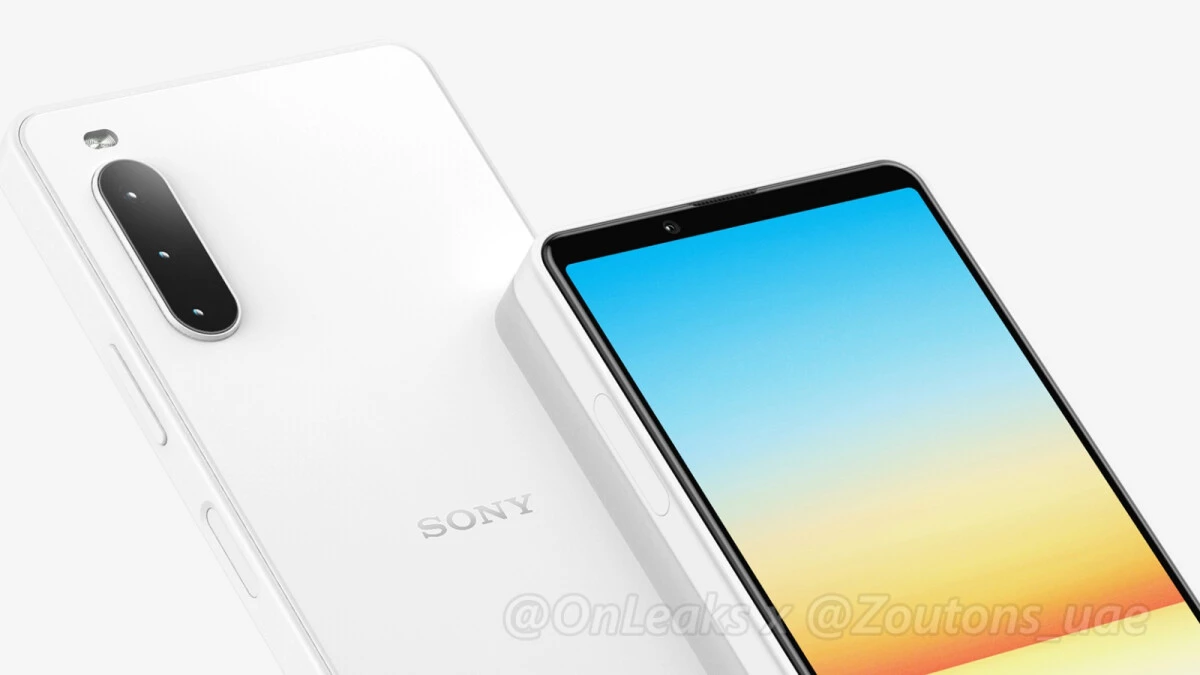
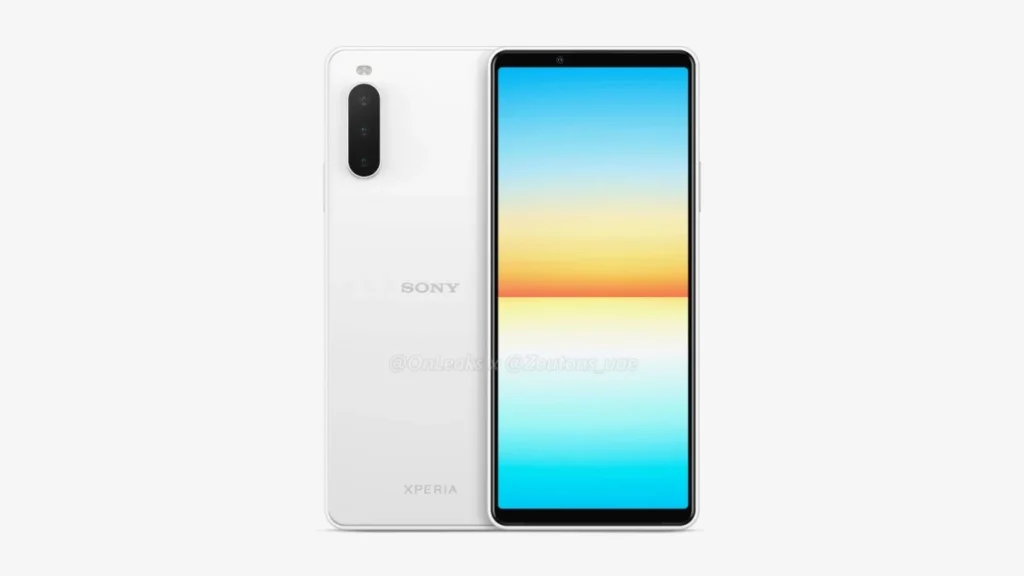
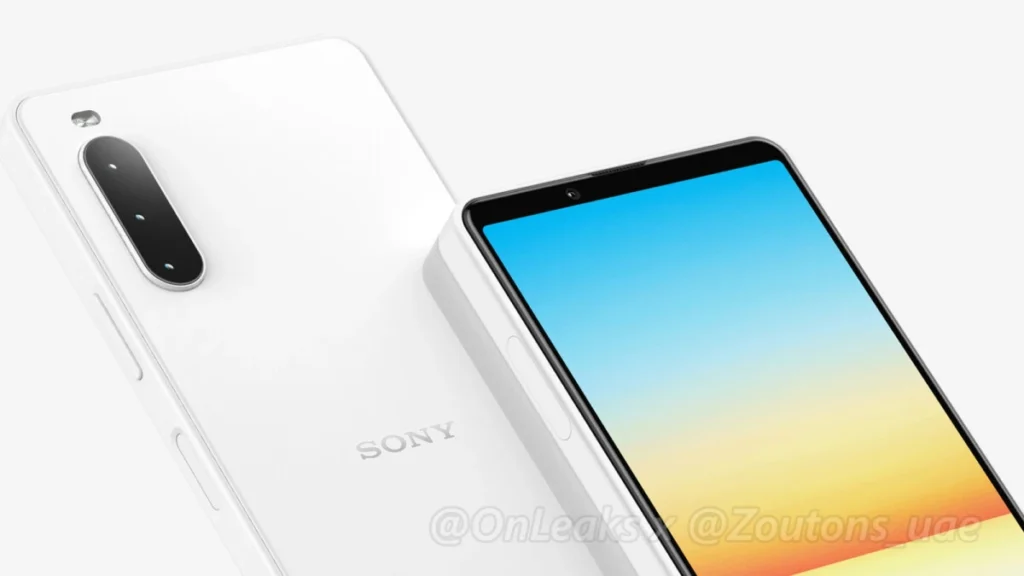
    These renders, courtesy of OnLeaks and Zoutons, show the future Xperia 10 IV with a familiar appearance. With a tall and thin 6-inch flat OLED display and those nostalgia-inducing bezels on the chin and forehead, the new phone looks a lot like the Xperia 10 III before it. Although they aren’t as large as they once were, they are still a far cry from the elegant, fullscreen displays found on handsets like the Galaxy S22 Ultra.

    The phone’s back is quite plain, featuring a triple camera array, an LED flash, and the Sony Xperia branding. It also has a fingerprint sensor on the side, a 3.5mm headphone connection on the top — rejoice, wired headphones fans — and a USB-C port on the bottom. There are two front-firing speakers.

    Despite its numerous similarities to the Xperia 10 III, the Xperia 10 IV has a few exterior differences. There’s no distinct Google Assistant button, for example – barely a miss, given that there are so many methods to access Assistant these days that a physical control feels extraneous. However, a shutter button, similar to the one found on the Xperia 1 series, would have been a great substitute. When it comes to differences, the frame is likely the most evident. Sony appears to be following the lead of Samsung and Apple, since the Xperia 10 IV has flat edges rather than rounded ones.

    Sony’s upcoming Xperia 10 IV will likely have a Qualcomm Snapdragon 690 chipset under the hood, paired with 6GB of RAM and 128GB of internal storage on the base model. It’ll be powered by a 4000mAh cell and come in Black, White, Mint Green, and Berry Blue colors. Pricing and launch info are still up in the air, but the new smartphone is expected to hit the markets in mid-2022.

  • Kernel bug exposes Android to potential malware – Linux Dirty Pipe

    Kernel bug exposes Android to potential malware – Linux Dirty Pipe

    If Android were a car engine, and you popped the hood and poked around a bit, you’d find the label “Linux” etched on the engine block. The open-source operating system provides the starting point that Android’s built on top of, but sharing code also means sharing vulnerabilities. Now a newly discovered Linux kernel bug is raising concerns for the security of Android devices, as it leaves a door open for malware intrusion.

    The glitch in question has been dubbed “Dirty Pipe” by software engineer Max Kellerman, who provides a detailed writeup about the bug’s discovery. He first spotted some mysteriously corrupted log files last year, and his analysis of the problem revealed a kernel-level flaw that’s existed since 2020. The vulnerability lets software overwrite the system page cache, even for files where apps shouldn’t otherwise have permission. He determined that in the wrong hands the issue had potential for exploitation and alerted the team behind Linux kernel security. Properly coded malware could use this method to obtain full control of a vulnerable system by overwriting files as vital as the system’s root password.

    Kellerman was also able to reproduce the bug on a Pixel 6, and reached out to let Google know. The company similarly prepared a fix, and merged it into the Android kernel. Right now, it’s just a matter of OEMs needing to incorporate that fixed kernel in future device updates.

    For what it’s worth, Google confirmed to Android Police that Dirty Pipe did not play a role in delaying the release of Android 12L for the Pixel 6. Linux users, meanwhile, need to install their distro’s most recent security updates ASAP.