Robert Haba is the founder and editor-in-chief of Droid Tools. A lifelong gadget enthusiast with over a decade following the Android ecosystem, he built this publication to cut through the noise and give readers honest, real-world coverage of the tech they actually use.
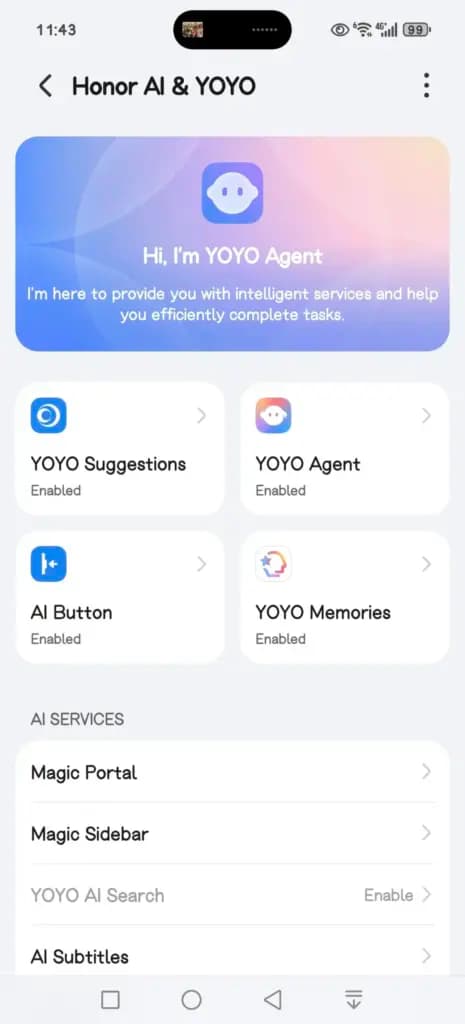
Honor is rolling out a new MagicOS 10 update to the Magic 7 series, introducing a range of YOYO AI features alongside broader system improvements. The April 2026 update is now being pushed to devices, with the Magic 7 lineup among the first to receive the firmware.
This release focuses heavily on AI enhancements while also refining the Honor Connect app. Honor has made changes across multiple parts of the system, including the Magic Capsule, home screen, and lock screen. The update also improves overall system stability and strengthens device security.
A key highlight is the expanded YOYO AI functionality. In the Magic Capsule, Honor has added a new “meal pickup code” tool that notifies users when it’s time to collect an order and displays the associated delivery code.
The update also introduces an “Ask YOYO” option within the screenshot interface. Users can upload a screenshot and ask questions about its content, making it easier to extract information directly from images.
Another addition allows users to convert images into documents in just a few steps, further extending the assistant’s practical capabilities.
The update is arriving as MagicOS version 10.0.0.150 for the Honor Magic 7 series.
YOYO Suggestions & Smart Capsule now support meal pickup code reminders, providing users with a smart and convenient meal pickup experience.
Turn on Meal Pickup Code Reminder and Automatic Meal Pickup Code Recognition.
YOYO now features a new wake-up screen with a Q&A feature, supporting fingertip selection of screen content for Q&A, text selection for copying and translation, and AI image recognition and interpretation, enhancing your ease of use and usability.
The screenshot feature now includes an “Ask YOYO” feature, allowing users to wake up YOYO with a single click and upload a screenshot for easy content recognition, Q&A, and other operations.
Added YOYO’s photo-to-document feature, allowing users to convert images into editable Word, Excel, and PPT documents with a single click. It highly preserves the accuracy and structural integrity of the original text, achieving a “what you see is what you get” experience, making mobile office work more convenient and efficient.
Added YOYO Helper, supporting simultaneous audio and text recording during online/offline meetings. It can assist with Q&A and provide intelligent reminders during the meeting, and intelligently generate meeting minutes afterward.
System smooth
Added a customizable app transition animation feature, offering three levels of smoothness: gentle, stable, and efficient, allowing you to customize the smooth experience to your liking.
Optimized the real-time blur effect when launching and exiting desktop applications, making your user experience smoother and more fluid.
Home Screen
Added an auto-align icon feature for a neater layout. Access it via: Settings > Desktop & Personalization > Desktop Settings > Auto-align Icons
Added support for one-click folder creation across multiple applications; long-pressing a folder on the desktop allows for one-click unpacking, making folder organization more convenient.
Added support for batch removal and uninstallation of applications, making desktop management more efficient.
Theme
Added a new status bar skinning feature, allowing you to freely change the status bar icon style and personalize your phone’s interface.
Lock screen
Added support for customizable lock screen widgets, providing one-click access to frequently used functions for both convenience and personalization.
Added support for custom fingerprint styles, allowing you to freely combine the lock screen fingerprint icon and fingerprint animation to create your own personalized unlocking experience.
Several new AI services have been added, supporting features such as song recognition, AI subtitles, Honor Any Door, and YOYO Notes, making your daily operations more convenient and efficient.
Honor Connect
Added cross-device file management for Mac, allowing you to easily browse, download, and manage pictures, videos, and other files from your phone on your Mac. Say goodbye to cumbersome transfers and enjoy efficiency and convenience.
Added a new iPhone hotspot feature. After connecting your Honor phone and iPhone, you can easily connect to your phone’s personal hotspot from your iPhone, eliminating cumbersome setup and making internet access more convenient.
Enjoy the bass
Added support for multiple apps, including 29 apps such as Red Fruit Free Short Drama, CCTV News, and Valorant.
Honor Smart Space
Added support for creating and managing multiple pet health records, and supports 24-hour AI-powered pet consultation, providing pet health reports and treatment suggestions to protect your pet’s health.
Power consumption
Optimize power consumption in certain scenarios.
Stability
Improved system stability and optimized some third-party app crashes and unresponsiveness issues, making your phone run more stably.
Security Patch
Includes the Android March 2026 security patch to enhance system security.
Robert Haba is the founder and editor-in-chief of Droid Tools. A lifelong gadget enthusiast with over a decade following the Android ecosystem, he built this publication to cut through the noise and give readers honest, real-world coverage of the tech they actually use.
Google is introducing new Android scam protections, including Enhanced Protection in Messages, call-forwarding warnings, and screen-share privacy defenses.
By Cristian Penisoara
Next in queue
Read the next article
The next story loads as you reach the end. You can also load it using the button.
Comments & Discussions
Join the conversation! We use Disqus to handle comments. Click the button below to load the comment section.







Comments & Discussions
Join the conversation! We use Disqus to handle comments. Click the button below to load the comment section.