Google Discover has restored an option that lets users completely block posts from X. Over the weekend, users noticed the return of the setting in the feed’s feedback menu. Previously, Discover had increasingly directed users to social media posts instead of linking directly to news stories.
Discover previously served as a central place to find stories on everyday topics, helping drive traffic to online publications. Over time, Google increased its focus on artificial intelligence, including systems that change headlines written by authors. The feed also went through phases of displaying unwanted videos, advertisements, and links to X (Twitter), reducing direct access to stories published by news outlets.
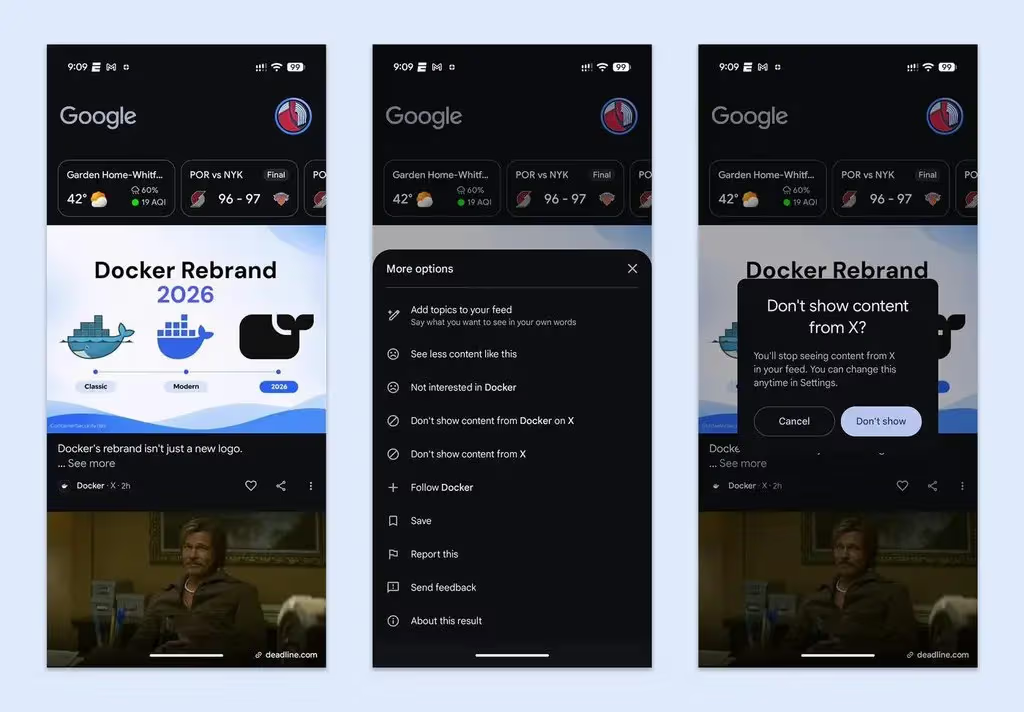
Instead of providing a direct link to a featured news story, Discover often selected a post on X where the publication had shared that article. Readers had to click through to X and then tap a link inside the post to reach the publication.
To block posts from X, users can tap the three-dot menu on a Discover story card to open the feedback options. Previously, this menu allowed users to add topics, save items, indicate they were not interested, or hide specific content from X, but the ability to block the platform entirely had been removed.
The menu now includes the option to “Don’t show content from X,” located alongside the setting to hide content from a specific account on X. The same option should also apply to Threads, allowing users to remove Threads posts if they appear. After selecting the option to block X and refreshing the feed, Discover reloads with direct links to news publications. The report also recommends following favorite publications and setting them as preferred sources within the service.

Luiza Mosneagu is Reviews Editor at Droid Tools. A psychologist by training and tech writer by passion, she has tested over 60 Android devices since 2020 - always for a minimum of two weeks before writing a word. Her focus is camera quality, everyday usability, and cutting through marketing claims to tell you what a device is actually like to live with.

Android earthquake alerts turn phones into seismic sensors, issuing Be Aware, Be Ready, or Take Action warnings based on expected shaking intensity.
Google updated Find Hub to support native left-behind reminders on compatible trackers, including Moto Tag and Chipolo, with custom exclusion zones.

Google released Create My Widget in the November Pixel Drop. Eligible Pixel users can access it early by enrolling in the Google Play beta.

If Gboard Rambler is missing after the November 2026 update, updating Android AI Core manually can activate the voice typing feature on Pixel 10 devices.
The next story loads as you reach the end. You can also load it using the button.

Samsung Galaxy Watch 8



Comments & Discussions
Join the conversation! We use Disqus to handle comments. Click the button below to load the comment section.