Skip to content
Droid Tools
Latest
/
NewsPhonesReviewsGuides

Devices

  • PhonesLaunches, specs & what comes next
  • WearablesWatches, trackers & everyday tech

Software

  • AppsNew features & useful discoveries
  • Android OSUpdates, rollouts & security patches

Read & learn

  • NewsThe latest across mobile technology
  • ReviewsA closer look at devices & accessories
  • GuidesPractical tips & troubleshooting

In the spotlight

NewsSoutheast Asia smartphone shipments dropped 36% in Q3 2026 amid memory shortagesRead the story
All news
About Droid ToolsContact

Browse by brand

  • AppleiPhone, iPad & Apple Watch
  • SamsungGalaxy, One UI & more
  • GooglePixel, Android & Google apps
  • XiaomiXiaomi, Redmi & HyperOS
  • OnePlusPhones, watches & OxygenOS
  • HuaweiPhones, wearables & HarmonyOS
  • OppoFind, Reno & ColorOS
  • HonorMagic, wearables & MagicOS
  • MotorolaRazr, Edge & Moto

Latest from the brands

NewsSoutheast Asia smartphone shipments dropped 36% in Q3 2026 amid memory shortagesRead the story
Follow the brands behind your everyday tech.All phones

Deals & buying advice

Find your next upgrade.

Reported discounts on phones, wearables and accessories. Check each retailer for current pricing and availability.

Browse all deals

Recent deal coverage

  • PhonesAmazon cuts Samsung Galaxy S26 Ultra price by over $260Read the story
  • WearablesSony WF-1000XM6 earbuds drop to $238 in limited B&H Photo Video discountRead the story
  • NewsWalmart cuts iVANKY ultra-slim magnetic power bank to $15 in 50% discountRead the story
All deals Explore our guides
  • About Us
  • Contact
  • Editorial Policy
  • Review Policy
  • Privacy Policy
  • Terms & Conditions
  • Cookie Policy
  • Affiliate Disclosure
  • Disclaimer
  • HTML Sitemap

Follow Droid Tools

FacebookXInstagramThreadsLinkedInBlueskyTikTokTelegramMastodonRSS Feed
Droid Tools

Droid Tools covers the latest Android news, device reviews, app updates, and OS guides. Independent mobile tech reporting and practical advice.

Explore

  • News
  • Phones
  • Apps
  • Android OS
  • Wearables
  • Guides
  • Reviews
  • Deals

Legal & Info

  • About Us
  • Contact
  • Editorial Policy
  • Review Policy
  • Privacy Policy
  • Terms & Conditions
  • Cookie Policy
  • Affiliate Disclosure
  • Disclaimer
  • HTML Sitemap
© 2026 Droid Tools. All rights reserved.
Home/Guides/How to Set Up Find Hub Left-Behind Reminders for Bluetooth Trackers
Guides
•google

How to Set Up Find Hub Left-Behind Reminders for Bluetooth Trackers

Google updated Find Hub to support native left-behind reminders on compatible trackers, including Moto Tag and Chipolo, with custom exclusion zones.

Robert Haba• Founder · Editor-in-Chief
Nov 19, 2026•3 min read
0%
Share on XFacebookBluesky
Follow on Google
Trust this source on GoogleAlways see our reviews and tech guides first in search results
Add trusted source

Left-behind reminders are among the most useful features of Bluetooth trackers, notifying you when you walk out the door before you realize you left your keys at a restaurant. Google updated the Find Hub app to support these reminders natively, removing the need to use separate companion apps for compatible hardware such as Chipolo products and the Moto Tag.

Enabling reminders on existing and new trackers

To activate reminders on an existing compatible tracker:
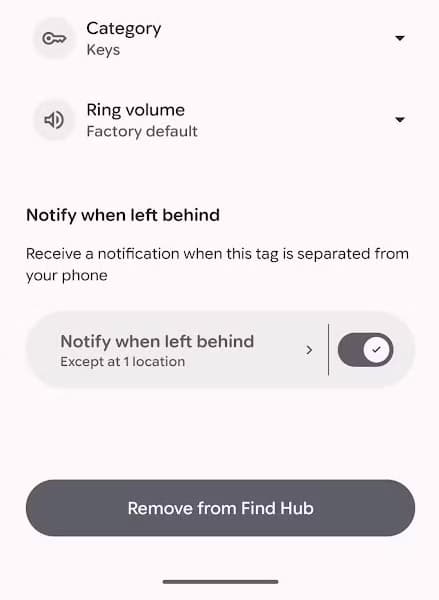
  • Open the Find Hub app.
  • Select the tracker that supports Left-Behind Reminders.
  • Tap the settings button (cog icon).
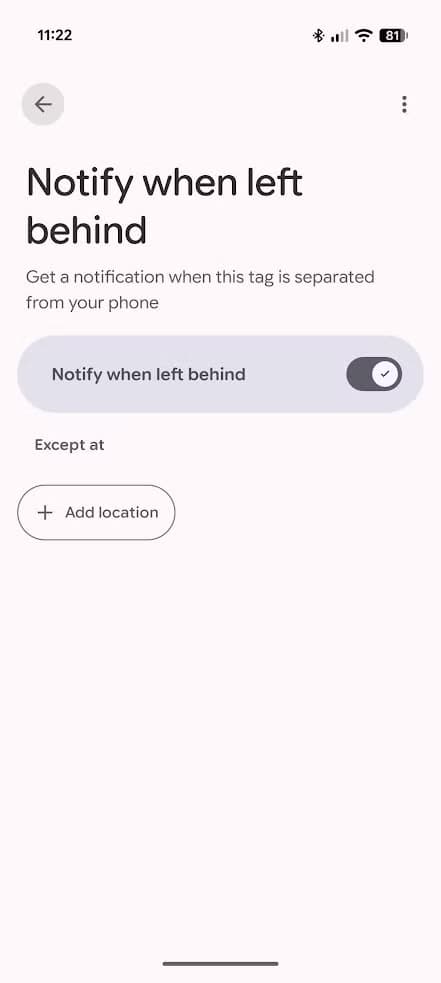
  • Toggle on the “Notify when left behind” switch.
find hub enable left behind

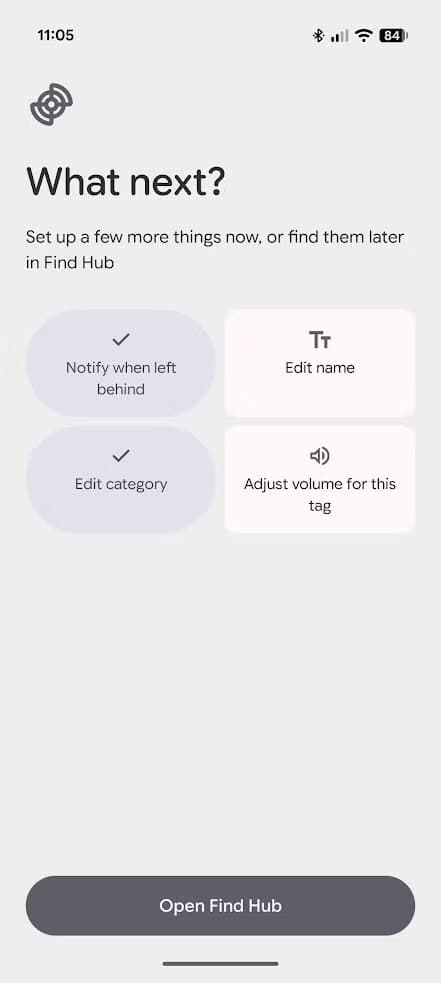
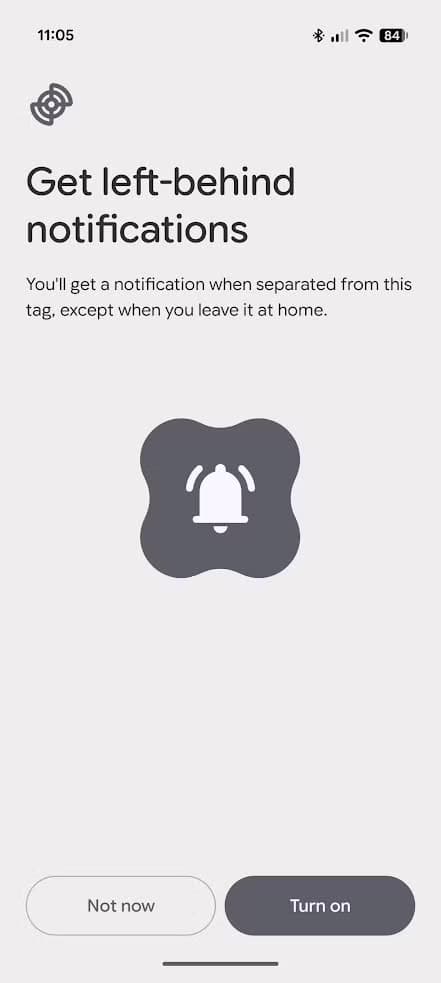
Find Hub also prompts you to enable reminders during initial tracker setup:

  • On the “What Next?” page, select “Notify when left behind.”
  • Tap “Turn on.”
  • Continue with setup.

Configuring blocked areas to avoid notification spam

Leaving keys at home is often intentional, such as when someone else is at home or when you notice the missing keys while locking the door. Under those circumstances, repeated notifications can be annoying.

Find Hub allows you to set areas where reminders are blocked:

  • Open tracker settings and find the “Notify when left behind” switch.
  • Tap the button to the left of the switch instead of toggling it.
  • Tap “Add location.”
  • Navigate to the location where you want alerts blocked.

You can configure a circular blocked area between 98 yards and 3.1 miles in diameter. These exclusion zones can be applied across all compatible trackers or customized tracker by tracker.
You may also likeRelated
GuidesHow to enable Create My Widget on Google Pixel phonesNov 18, 2026→GuidesHow to enable Gboard Rambler on Pixel 10Nov 17, 2026→GuidesGoogle brings Extreme Charging Mode to Pixel 10 phonesNov 17, 2026→
How to Set Up Find Hub Left-Behind Reminders
Set Up Find Hub Left-Behind Reminders
Find Hub Left-Behind Reminders

Hardware requirements and earbud support

While tracking keys and wallets is helpful, separation reminders are especially desirable for earbuds like the Google Pixel Buds Pro 2, which are easy to misplace. While the Find Hub app helps locate them after they go missing, the Pixel Buds Pro 2 do not support Left-Behind Reminders, and the author doubts they will.

Left-Behind Reminders require constant communication between the phone and tracker. Devices need adequate battery life and the ability to distinguish an actual separation from temporary connection problems, such as thick walls obstructing Bluetooth signals. Devices without optimized hardware will likely never support the feature. However, most new trackers include support, leaving open the possibility for future earbuds or headphones.

Alert speed comparison and the Pixel Tag

In testing, Chipolo’s app alerted faster than Find Hub, which took up to two minutes longer to notify that a tracker was left behind. While Chipolo lacks location configuration options and alerts every time, Find Hub’s two-minute delay remains effective and dependable enough for everyday use.

These improvements align with Google preparing for the Pixel Tag launch. While the author is unsure of its distinct value alongside existing trackers, the update ensures Google’s tracking app supports expected core features across compatible devices.

Trust this source on GoogleAlways see our reviews and tech guides first in search results
Add trusted source
Tags:#behing#find#findhubgoogle#hub#left#tracker
Recommended Deals
1 / 9
💎Best Android Device
Samsung Galaxy S26 Ultra

Samsung Galaxy S26 Ultra

4.9
$1,212.85$1,499.99-19%
Buy on Amazon
* As an Amazon Associate, Droid Tools earns from qualifying purchases. Read our editorial policy
Robert Haba
Robert HabaFounder · Editor-in-Chief
X

Robert Haba is the founder and editor-in-chief of Droid Tools. A lifelong gadget enthusiast with over a decade following the Android ecosystem, he built this publication to cut through the noise and give readers honest, real-world coverage of the tech they actually use.

Next Story in Guides

How to enable Create My Widget on Google Pixel phones

Google released Create My Widget in the November Pixel Drop. Eligible Pixel users can access it early by enrolling in the Google Play beta.

→

Latest Stories

Google Wallet digital home keys roll out to unlock compatible smart locks01

Google Wallet digital home keys roll out to unlock compatible smart locks

02

One UI 9.5 leaks reveal interface changes and new features for Galaxy devices

03

Southeast Asia smartphone shipments dropped 36% in Q3 2026 amid memory shortages

04

Galaxy S27 Ultra camera leak points to three rear lenses

Recommended Deal
-13% OFF
Google Pixel Watch 5 (45mm)

Google Pixel Watch 5 (45mm)

5.0(1,771 reviews)
$459.99$529.99
Buy on Amazon

* As an Amazon Associate, Droid Tools earns from qualifying purchases.

Top Deals

Amazon cuts Samsung Galaxy S26 Ultra price by over $260

Deal
Amazon cuts Samsung Galaxy S26 Ultra price by over $260

Sony WF-1000XM6 earbuds drop to $238 in limited B&H Photo Video discount

Deal
Sony WF-1000XM6 earbuds drop to $238 in limited B&H Photo Video discount

Walmart cuts iVANKY ultra-slim magnetic power bank to $15 in 50% discount

Deal
Walmart cuts iVANKY ultra-slim magnetic power bank to $15 in 50% discount

Continue reading

More from this category →
How to enable Create My Widget on Google Pixel phones
GuidesNov 18, 2026

How to enable Create My Widget on Google Pixel phones

Google released Create My Widget in the November Pixel Drop. Eligible Pixel users can access it early by enrolling in the Google Play beta.

By Cristian Penisoara
pixel 11 pro xl gboard rambler
GuidesNov 17, 2026

How to enable Gboard Rambler on Pixel 10

If Gboard Rambler is missing after the November 2026 update, updating Android AI Core manually can activate the voice typing feature on Pixel 10 devices.

By Luiza Mosneagu
Google brings Extreme Charging Mode to Pixel 10 phones
GuidesNov 17, 2026

Google brings Extreme Charging Mode to Pixel 10 phones

Google rolled out Extreme Charging Mode to the Pixel 10 in Android 17 QPR2, temporarily boosting charging speeds below 50% battery.

By Cristian Penisoara
Google lists Quick Share automatic backup to Windows PCs in new release notes
GuidesNov 13, 2026

Google lists Quick Share automatic backup to Windows PCs in new release notes

Quick Share automatic backup will let Android users save photos and videos to Windows PCs via Google Play services v26.43, rolling out gradually.

By Luiza Mosneagu
Next in queue

Read the next article

The next story loads as you reach the end. You can also load it using the button.

Comments & Discussions

Join the conversation! We use Disqus to handle comments. Click the button below to load the comment section.