Google brought Extreme Charging Mode to the Pixel 10 in the Android 17 QPR2 update. The software-based feature temporarily boosts speeds below 50% battery by pausing background app processes. It requires a compatible charger and cable, with speeds eventually returning to the phone's standard maximum limit.

Pixel 10 owners are receiving Extreme Charging Mode, a feature that initially launched on the Pixel 11 series. Google is delivering the feature to Pixel 10 handsets as part of the Android 17 QPR2 update that rolled out yesterday alongside the November Pixel Drop for Pixel phones. Google also recently started rolling out Create My Widget to both the Pixel 10 and Pixel 11 series.
Google says Extreme Charging Mode only kicks in when a device’s battery is below 50%. The feature gives the phone a slight boost in charging speed, raising it to a higher level before the device charges normally.
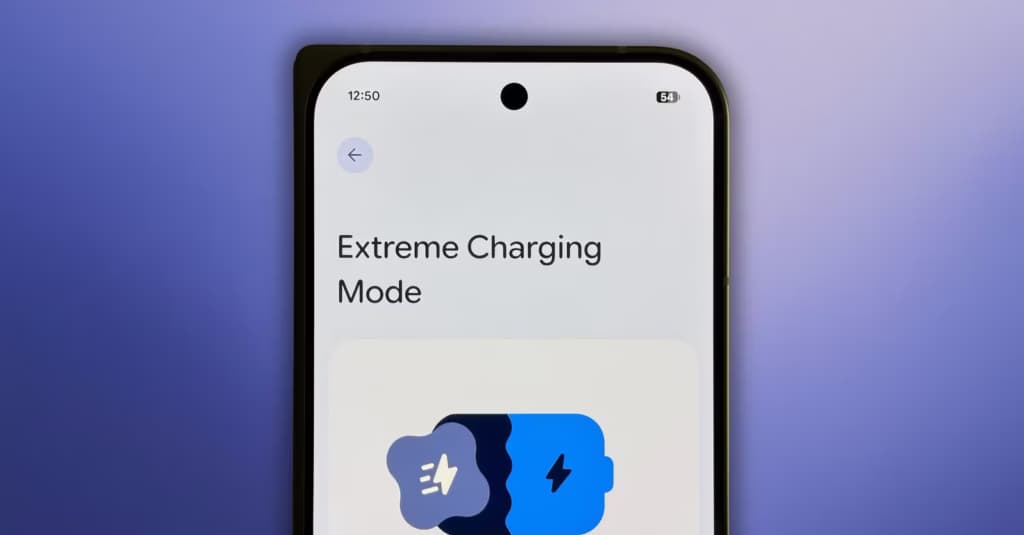
As reported by Android Police, Extreme Charging Mode is a software-based feature rather than a hardware-based one. It boosts charging speeds temporarily by pausing background app processes to optimize charging for that period. Because those background applications are paused temporarily, charging speeds eventually return to normal. Users remain limited by whatever maximum charging speeds their phone supports, such as 30W wired charging on the base Pixel 10.
Google also notes that users need a compatible charger for this to work, such as the company’s 65W dual-port charging brick and a compatible cable. While the feature turns on automatically whenever phone battery levels drop below 50%, owners can also turn it on manually.
Turning on the feature manually for the first time brings up a Quick Settings tile, making it more convenient to enable during future charging sessions. To find the setting and turn it on manually, go into phone Settings, select Battery and Charging, choose Extreme Charging Mode, and tap Turn On Now.
Apple Watch Series 12

Cristian Penisoara is a Guides Writer and Android specialist at Droid Tools. An Android user since version 2 and a professional event photographer, he combines technical curiosity with a detail-oriented approach - every guide he publishes is tested step-by-step on a real device before it goes live.

Quick Share automatic backup will let Android users save photos and videos to Windows PCs via Google Play services v26.43, rolling out gradually.

Google Home Wi-Fi presence sensing uses local network connections to prevent accidental triggers and improve the accuracy of Home and Away routines.
Learn how to sideload APKs safely by checking signatures, reviewing permissions, using APK Analyzer, and tracking updates with Obtainium or APKUpdater.
Learn how to use Gemini hands-free to control device settings, place calls, dictate messages, and handle tasks from the lock screen.
The next story loads as you reach the end. You can also load it using the button.


Comments & Discussions
Join the conversation! We use Disqus to handle comments. Click the button below to load the comment section.