Google Pixel owners can disable automated camera modifications by turning off Auto Best Take on Pixel 10 devices, Auto Edit on Pixel 11 models, or disabling Top Shot entirely. While phones retain baseline processing, these toggles stop several erratic AI composites and edits.

Google Pixel phones are widely recognized for camera performance, with the mobile industry frequently ranking them among the best. While some buyers choose a Pixel for clean software, camera capability defines the lineup. Google continues to add automated features, yet those tools can produce odd results. For users who prefer predictable photos, the choice to turn off Pixel camera AI features restores straightforward shooting. A reviewer recently documented severe errors across the Pixel Camera app and Google Photos, including a picture of young children on a couch where processing placed one child’s head inside an iPad. Another photo gained fictional tattoos on a subject.
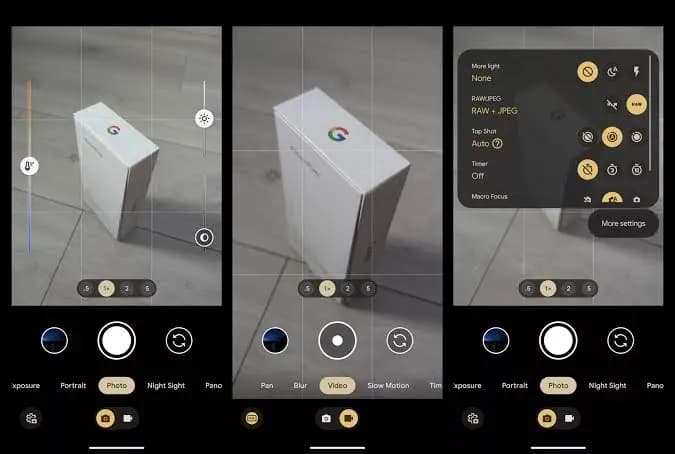
Because modern Pixel phones perform extensive computational processing, you cannot disable every background adjustment. Disabling specific automated settings, however, removes the most disruptive edits and returns the device closer to standard operation. The primary setting to review is Auto Best Take, available on the Pixel 10 and newer models. Auto Best Take combines multiple rapid frames into one composite picture using Google AI. The software attempts to solve group portraits where people blink or look away while others smile. When several alternate shots exist, Google AI scans the set to locate exposures where everyone looks just right, then merges those elements into a single finished frame. Google previously offered a similar manual tool on the Pixel 9 series named Best Take.
To disable Auto Best Take on a compatible Pixel:
The next control to evaluate is Top Shot. When active, Top Shot records a brief sequence of frames around the shutter press, automatically picking the frame it evaluates as the strongest shot. Auto Best Take depends on Top Shot to gather those alternate exposures. Turning off Top Shot therefore shuts down both automated features in a single move.
To turn off Top Shot directly:
On Pixel 11 models, Google introduced an additional setting named Auto Edit within the Magic Capture menu. The interface describes the utility as automatically improving your best moments. That description drew skepticism from the original tester, who questioned whether automated software should alter personal moments on its own judgment.
To turn off Auto Edit on a Pixel 11:
The accompanying menu diagram illustrates each of these settings, with arrows pointing directly to where the toggles appear in the camera interface. Adjusting these three controls helps curb intrusive auto-editing and keeps your Pixel photos closer to what you actually framed.
Apple Watch Series 12

Luiza Mosneagu is Reviews Editor at Droid Tools. A psychologist by training and tech writer by passion, she has tested over 60 Android devices since 2020 - always for a minimum of two weeks before writing a word. Her focus is camera quality, everyday usability, and cutting through marketing claims to tell you what a device is actually like to live with.
A traveler recovered a lost smartwatch in ten minutes using Pixel Watch Find Hub settings. Learn how to configure location toggles and ring missing devices.

Track the Google Pixel update schedule, including seven-year lifespans for newer models, quarterly patch shifts, and dual Android OS release windows.

Google explained how to manage Android time zones as Canadian regions end seasonal time changes, offering steps for automatic and manual clock adjustments.

Quick Share for Windows transfers files from Android to your PC over Wi-Fi at rates up to 100MB/s, bypassing email and third-party cloud uploads.
The next story loads as you reach the end. You can also load it using the button.


Comments & Discussions
Join the conversation! We use Disqus to handle comments. Click the button below to load the comment section.