Google has begun rolling out an optional Enhanced Protection setting in Google Messages beta. The feature uses cloud-based Gemini models to identify conversational scams and on-device Gemini Nano to inspect suspicious links on supported Pixel and Galaxy devices.

Google has started rolling out Google Messages Enhanced Protection to Android devices in a gradual release. The optional setting adds cloud-based machine learning and local link inspection to catch deceptive text fraud. Many scammers avoid obvious warning signals such as fake lottery notifications or raw malicious links. Instead, they initiate normal conversations, posing as couriers or banking representatives to build trust over multiple messages. Once rapport exists, the exchange turns toward requests for personal data or direct money transfers. The upgraded protections aim to recognize these conversational patterns early, even when scammers follow unfamiliar scripts.

Google Messages includes existing spam filters, yet this new mode handles unknown senders differently. Enhanced Protection routes conversations involving numbers outside your contacts to Google’s cloud-based Gemini models for contextual analysis. Because feeding personal chats into external algorithms prompts immediate privacy concerns, Google relies on its Private AI Compute infrastructure. The company states that this architecture encrypts conversation data throughout transit and processes it inside an isolated compute environment. According to Google, that separation prevents anyone, including internal staff, from viewing the raw message content.
A second safeguard targets dubious web links shared in incoming texts. On compatible devices, the on-device Gemini Nano model coordinates with live web information to assess unfamiliar URLs. This local check can identify hazardous websites before those domains make their way onto established threat registries. In addition, Google Messages displays clearer alerts whenever an unrecognized number sends a hyperlink. The prominent prompt gives recipients a distinct chance to reconsider before opening an unexpected webpage.
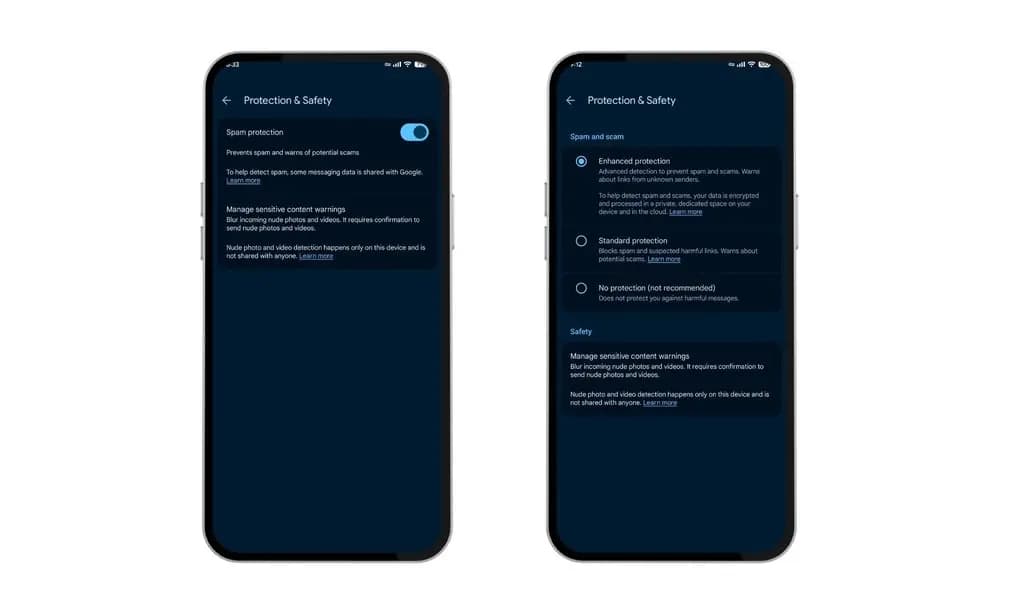
You do not need to open the main Android system settings to adjust these safeguards. Configuration takes place within the Google Messages app itself. Tap your profile picture in the upper corner, open Messages settings, and select Protection & safety. From there, select Spam & scam protection. The application displays three preferences: Enhanced Protection, Standard Protection, and No Protection. Standard Protection serves as the preselected default. Anyone wanting the AI-driven conversational analysis and link monitoring must manually switch over to Enhanced Protection.
Beta reports indicate that Enhanced Protection has started showing up in Google Messages beta version 20261020_00_RC00, although availability remains restricted. Even among enrolled testers, the option appears in waves. Device requirements create another limitation. The smarter link inspection relies on on-device capabilities that Google currently limits to specific handsets. That roster includes Google’s Pixel 10 series and newer releases, Samsung’s Galaxy S26 lineup, the Galaxy Z Flip 8, the Galaxy Z Fold 8, alongside select other phones.
If the new options have not appeared in your application yet, there is no need to worry. Google is distributing the protection gradually across the Android user base. Broad availability is expected to take additional time as the phased deployment reaches more devices.

Google Pixel Watch 4

Luiza Mosneagu is Reviews Editor at Droid Tools. A psychologist by training and tech writer by passion, she has tested over 60 Android devices since 2020 - always for a minimum of two weeks before writing a word. Her focus is camera quality, everyday usability, and cutting through marketing claims to tell you what a device is actually like to live with.
Google Wallet is rolling out an in-app notifications feed on Android alongside expanded digital passport support for Ireland and Italy.

Google Messages Enhanced Protection may replace the single spam toggle with three security options, including cloud link scans, per a new leak.

Google Messages location sharing is testing new map layers, including traffic overlays, satellite views, and terrain options for real-time tracking.

The Google Phone Contacts tab is returning to the bottom bar for beta testers on version 243, rolling back a previous navigation change.
The next story loads as you reach the end. You can also load it using the button.


Comments & Discussions
Join the conversation! We use Disqus to handle comments. Click the button below to load the comment section.