Skip to content
Droid ToolsDroid Tools
Home

Explore

  • News
    430
  • OS
    272
  • Apps
    236
  • Phones
    191
  • Guides
    177
  • Wearables
    106
  • Reviews
    16

Latest Articles

  • OnePlus ColorOS 17 Rollout Sets Android 17 Dates as OxygenOS Retires
    OS

    OnePlus ColorOS 17 Rollout Sets Android 17 Dates as OxygenOS Retires

  • Android 17 November 2026 update comes with 12+ new features as Pixel Drop rolls out
    OS

    Android 17 November 2026 update comes with 12+ new features as Pixel Drop rolls out

  • Google Adds Step-by-Step Workout Guidance to Pixel Watch in November Pixel Drop
    Wearables

    Google Adds Step-by-Step Workout Guidance to Pixel Watch in November Pixel Drop

  • Pixel 11 Pro HiLight gains Google Messages support in November Pixel Drop
    Apps

    Pixel 11 Pro HiLight gains Google Messages support in November Pixel Drop

  • WhatsApp tests original media quality option and personal cover photos in Android beta
    Apps

    WhatsApp tests original media quality option and personal cover photos in Android beta

Live Offers

Deal Alerts

Browse reported discounts on phones, wearables, and accessories. Check the retailer for the current price and availability.

View All Deals

Latest Deal Alerts

  • Sony WF-1000XM6 earbuds drop to $238 in limited B&H Photo Video discount
    🔥 Offer

    Sony WF-1000XM6 earbuds drop to $238 in limited B&H Photo Video discount

  • Walmart cuts iVANKY ultra-slim magnetic power bank to $15 in 50% discount
    🔥 Offer

    Walmart cuts iVANKY ultra-slim magnetic power bank to $15 in 50% discount

  • 🔥 Offer

    Amazon offers $749 Pixel 10 Pro XL deal as memory prices climb

  • Moto Tag 2 price increases to $29.99 as introductory discount ends
    🔥 Offer

    Moto Tag 2 price increases to $29.99 as introductory discount ends

  • Samsung Galaxy S26 discounts continue on Amazon after October Prime Day
    🔥 Offer

    Samsung Galaxy S26 discounts continue on Amazon after October Prime Day

About UsContact
Editorial PolicyReview Policy
Privacy PolicyCookie PolicyTerms & Conditions
⌘K
Search
Official Channels10 Profiles
FacebookX (Twitter)InstagramThreadsLinkedInBlueskyTikTokTelegramMastodonRSS Feed
Droid Tools

Droid Tools covers the latest Android news, device reviews, app updates, and OS guides. Stay informed with hands-on coverage from mobile tech experts.

Explore

  • News
  • Phones
  • Apps
  • Android OS
  • Wearables
  • Guides
  • Reviews
  • Deals

Legal & Info

  • About Us
  • Contact
  • Editorial Policy
  • Review Policy
  • Privacy Policy
  • Terms & Conditions
  • Cookie Policy
  • Affiliate Disclosure
  • Disclaimer
  • HTML Sitemap
© 2026 Droid Tools. All rights reserved.
Home/Apps/Google Photos overnight backup feature surfaces in app teardown
Apps
•google

Google Photos overnight backup feature surfaces in app teardown

Google Photos is testing an overnight backup setting that keeps phones awake to complete uploads. The feature is not yet available to users.

Robert Haba• Founder · Editor-in-Chief
Nov 12, 2026•2 min read
Google Photos overnight backup feature surfaces in app teardown
0%
Share on XFacebookBluesky
Follow on Google
Trust this source on GoogleAlways see our reviews and tech guides first in search results
Add trusted source

Google is developing an overnight backup feature for Google Photos to help users upload large photo and video collections without interruptions. Backing up media to Google Photos can take substantial time and often stops midway unless the app remains open in the foreground. Android restrictions on background processes typically limit uploads when a device is idle, so this feature keeps the phone awake to allow large batches of media to upload while users sleep.

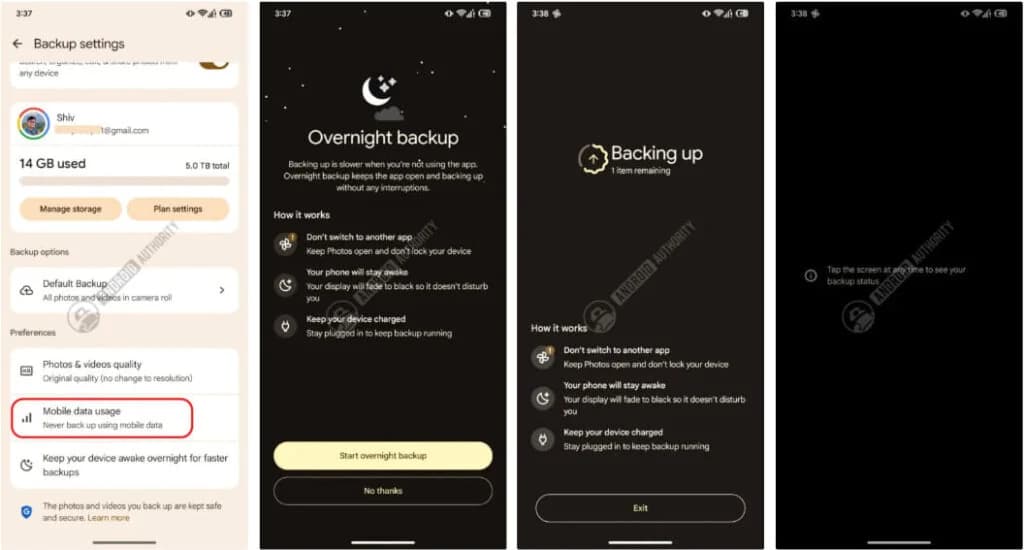
The unreleased option was unlocked in version 8.0 of the Google Photos app. It appears in Backup settings as “Keep your device awake overnight for faster backups.” The feature does not run automatically; users must turn it on manually.
Source: Android Authority

How the overnight upload process works

Selecting the feature opens a screen with a dim background that outlines the setup requirements. It instructs users to keep the phone unlocked, charged or plugged in, and running Google Photos in the foreground.

Tapping the “Start overnight backup” button begins the process. A squiggly circle indicates progress and the degree of completion. Within a few seconds, the screen turns completely black to reduce power consumption while keeping the phone active. Tapping the black screen brings back the previous interface. Once the backup finishes, a notice displays the number of media items uploaded to the cloud.

Network alerts and backup scheduling

The app teardown also revealed an alert screen for network connectivity. If Wi-Fi is unavailable, the screen warns users and provides an option to continue the backup using mobile data.

The overnight backup tool is not yet available to the public. In addition to this feature, Google has been testing an option to schedule media backups to run at a specific time.
You may also likeRelated
AppsSamsung Keyboard may add Pixel 11 voice cleanup tool in One UI 9.5Nov 12, 2026→AppsGboard Rambler may soon learn corrected words and contact namesNov 12, 2026→AppsPixel 11 Pro HiLight gains Google Messages support in November Pixel DropNov 11, 2026→
Trust this source on GoogleAlways see our reviews and tech guides first in search results
Add trusted source
Tags:#app#apps#backupgoogle#guide#photos
Recommended Deals
1 / 9
Google Pixel 11 Pro

Google Pixel 11 Pro

4.9
$849.00$1,099.00-23%
Buy on Amazon
* As an Amazon Associate, Droid Tools earns from qualifying purchases. Read our editorial policy
Robert Haba
Robert HabaFounder · Editor-in-Chief
X

Robert Haba is the founder and editor-in-chief of Droid Tools. A lifelong gadget enthusiast with over a decade following the Android ecosystem, he built this publication to cut through the noise and give readers honest, real-world coverage of the tech they actually use.

Next Story in Apps

Samsung Keyboard may add Pixel 11 voice cleanup tool in One UI 9.5

Samsung Keyboard may add a voice cleanup tool similar to Pixel 11's Rambler in an internal One UI 9.5 test build reported by SamMobile.

→

Latest Stories

Meta Muse AI agent arrives on Wear OS and Apple Watch as a phone companion01

Meta Muse AI agent arrives on Wear OS and Apple Watch as a phone companion

02

Android 17 QPR2 November Update Rolls Out for Pixel Devices With 33 Fixes

03

Samsung Keyboard may add Pixel 11 voice cleanup tool in One UI 9.5

04

Gboard Rambler may soon learn corrected words and contact names

Recommended Deal
-13% OFF
Google Pixel Watch 5 (45mm)

Google Pixel Watch 5 (45mm)

5.0(1,771 reviews)
$459.99$529.99
Buy on Amazon

* As an Amazon Associate, Droid Tools earns from qualifying purchases.

Top Deals

Sony WF-1000XM6 earbuds drop to $238 in limited B&H Photo Video discount

Deal
Sony WF-1000XM6 earbuds drop to $238 in limited B&H Photo Video discount

Walmart cuts iVANKY ultra-slim magnetic power bank to $15 in 50% discount

Deal
Walmart cuts iVANKY ultra-slim magnetic power bank to $15 in 50% discount

Amazon offers $749 Pixel 10 Pro XL deal as memory prices climb

Deal

Continue reading

More from this category →
Samsung Keyboard may add Pixel 11 voice cleanup tool in One UI 9.5
AppsNov 12, 2026

Samsung Keyboard may add Pixel 11 voice cleanup tool in One UI 9.5

Samsung Keyboard may add a voice cleanup tool similar to Pixel 11's Rambler in an internal One UI 9.5 test build reported by SamMobile.

By Luiza Mosneagu
Gboard Rambler may soon learn corrected words and contact names
AppsNov 12, 2026

Gboard Rambler may soon learn corrected words and contact names

Evidence in a Gboard beta indicates Rambler could soon remember corrected words, identify contact names, and allow manual vocabulary imports.

By Robert Haba
pixel 11 highlight
AppsNov 11, 2026

Pixel 11 Pro HiLight gains Google Messages support in November Pixel Drop

The November Pixel Drop expands Pixel 11 Pro HiLight notifications to Google Messages, alerting users to incoming texts from favorite contacts.
By Cristian Penisoara
whstasapp
AppsNov 10, 2026

WhatsApp tests original media quality option and personal cover photos in Android beta

WhatsApp is testing original media quality and personal cover photos on Android beta, alongside Meta AI chats and an improved channel migration tool.

By Cristian Penisoara
Next in queue

Read the next article

The next story loads as you reach the end. You can also load it using the button.

Comments & Discussions

Join the conversation! We use Disqus to handle comments. Click the button below to load the comment section.