Samsung has officially confirmed what many Galaxy users feared: Samsung Messages is going away. The app will be fully discontinued in July 2026. It’s already been pulled from pre-installation on newer Galaxy devices, including the Galaxy S26 series. Once July hits, you won’t be able to download it from the Galaxy Store either. And shortly after that, sending messages through it will stop working — except to emergency numbers.
If you’ve been using Samsung Messages as your daily driver for SMS and RCS conversations, this is the moment to start thinking about your next move. Not next month. Now.
The good news? There are solid alternatives. The complicated news? None of them are perfect one-to-one replacements. Here’s an honest breakdown.
Across Reddit threads, Galaxy owners have expressed real frustration with this decision. Some have said things like “we might as well get Google Pixels” – because part of what made Samsung phones feel distinct was the software layer on top of Android. Losing Samsung Messages removes one more point of differentiation.
That’s a fair observation. Samsung Messages wasn’t just a texting app – it was a familiar interface for millions of users who had customized their notification sounds, set up message categories, and built habits around a specific UI. Switching costs are real, even for something as seemingly simple as a messaging app.
The other dimension here is RCS. Rich Communication Services — think of it as the modern upgrade to traditional SMS — enables typing indicators, read receipts, high-quality media sharing, and improved group chats. No alternative texting app outside of Google Messages currently has access to RCS. That means if you go with a different app, you’re stepping back to a more basic messaging experience — no read receipts, no high-res photo sharing, and frustrating group conversations.
That’s not a minor inconvenience. That’s a real trade-off.
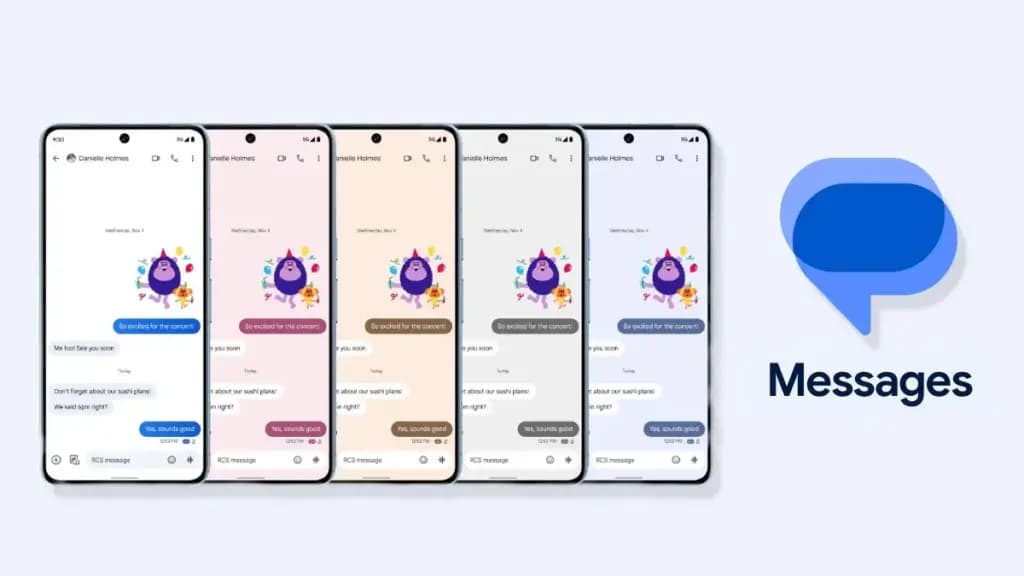
The most natural successor to Samsung Messages, especially if you want to keep RCS, is Google Messages. It’s already the default messaging app on most Android phones, and Google has been adding new features consistently to make it more capable.

With RCS enabled on Google Messages, you get typing indicators, message reactions, high-quality media sharing, and built-in spam protection. And since iOS 18, iPhones also support RCS – so cross-platform conversations with iPhone users are now much cleaner than the old SMS-green-bubble situation.
From a practical standpoint, the migration is straightforward. All messages and conversations will automatically transfer between Samsung Messages and Google Messages, though the process can take up to approximately 24 hours depending on how much data you have. That’s not a dealbreaker — just plan ahead.
What you’ll miss? Samsung Messages had better message categorization and a more flexible UI for organizing conversations. Google Messages is improving steadily, but it still feels slightly more rigid. And the Gemini AI integration – while genuinely useful for some – might feel intrusive if you just want a clean, minimal texting interface.
Still. If RCS matters to you, this is your best bet. It’s well-maintained, it’s free, and it works.
If you’re open to moving away from traditional SMS entirely, WhatsApp is probably the easiest transition. Most people already have it installed. It works across Android, iPhone, and even desktop. You get voice and video calls, group chats, message reactions, and end-to-end encryption by default.
There have been recent concerns around privacy with WhatsApp, with reports suggesting Meta employees could potentially access private messages – although the company has denied these claims. It’s something worth knowing, even if you decide it doesn’t change your decision.
Telegram is a different beast. It’s faster, more feature-rich than WhatsApp in some ways (channels, bots, large group support, customizable themes), and has a devoted user base. The catch: default chats on Telegram are not end-to-end encrypted – only “Secret Chats” are. That surprises a lot of people who assume Telegram equals private.
Both WhatsApp and Telegram require your contacts to also use the app. There’s a chance many people you know are already on these platforms — it might be worth a quick conversation with friends and family to see which one already has the most traction in your circle.
Signal is the gold standard for private messaging. Everything is end-to-end encrypted by default, the organization behind it is a nonprofit, and the app collects almost no metadata. If you’ve ever looked at WhatsApp’s privacy policy and felt uneasy, Signal is the answer.

The downside is that it’s not as widely used, and the feature set is more minimal compared to WhatsApp or Telegram. You’d need to convince your close contacts to switch — which isn’t always easy.
Signal also can’t replace SMS for people outside the app. So it works best as a secure messaging layer for a specific group — close friends, family, work contacts who are already privacy-conscious. Not a universal solution, but for what it does, nothing comes close.
Here’s where it gets more interesting.
On Reddit, Galaxy owners have been recommending apps like Textra SMS, Handcent Next SMS, Fossify Messages, Pulse SMS, and ZenSMS as alternatives. These apps are primarily SMS-focused, which means they feel a lot closer to the traditional Samsung Messages experience — customizable themes, cleaner UIs, message scheduling on some of them.
The trade-off is clear: none of them support RCS. You lose typing indicators, read receipts, and high-quality media delivery. If your contact list is split between Android and iPhone users and you’ve been enjoying the improved cross-platform experience that RCS brought, you’ll notice the difference immediately.
Textra, specifically, has been around for years and is genuinely well-designed. It’s a solid choice if you value aesthetic customization and don’t have strong feelings about RCS. Fossify Messages is open-source and lightweight — a good pick for users who want minimal data collection and a clean interface.
One thing people often overlook: the practical mechanics of switching.
To switch to Google Messages manually: open or download Google Messages from the Play Store, tap “Set default SMS app” when prompted, select Google Messages, and confirm. The switch is fairly painless.
A few things to be aware of:
The transfer itself is largely automatic. Just give it time.
Honestly? It depends on who you text.
If most of your contacts are on Android and you care about a seamless, modern texting experience — Google Messages. It’s not as customizable as Samsung Messages, but it’s the only real RCS option.
If you text internationally a lot and your social circle is already on it — WhatsApp. The network effect alone makes it worth considering.
If you want something that looks and feels closer to Samsung Messages, and you’re okay giving up RCS — Textra or Fossify Messages.
If privacy is non-negotiable — Signal, used alongside one of the above for regular SMS.
There’s no perfect answer here. Samsung Messages built a loyal user base over years, and its shutdown is a genuine inconvenience. But the replacement options are functional, and in some cases — particularly Google Messages with RCS — objectively more capable.
Start testing your top choice now, before July. Don’t wait until the last moment when the app goes dark.
When exactly is Samsung Messages shutting down? Samsung Messages will be discontinued in July 2026 in the US market. Users on Android 11 or lower are not affected by this end-of-service change.
Will I lose my messages when Samsung Messages shuts down? No — your SMS and MMS history is stored on your device, not in the app itself. Switching to a new app won’t delete your messages. RCS chat history may transfer automatically when you move to Google Messages.
Does any alternative support RCS like Samsung Messages did? Currently, Google Messages is the only third-party SMS app with access to RCS. Apps like Textra and other SMS alternatives do not support RCS.
Can I still use Samsung Messages after July 2026? After Samsung Messages is discontinued, sending messages through the app will no longer be possible, except for emergency service numbers or emergency contacts defined on your device.

Google Pixel Watch 5 (45mm)

Robert Haba is the founder and editor-in-chief of Droid Tools. A lifelong gadget enthusiast with over a decade following the Android ecosystem, he built this publication to cut through the noise and give readers honest, real-world coverage of the tech they actually use.
Rich Communication Services (RCS) has reshaped Google Messages, bringing read receipts, larger media attachments, and cross-platform messaging with iPhone users. RCS isn't without its own issues, though, and Messages has so far offered an easy way to opt out on a per-chat basis if it causes problems - a feature that now looks like it […]

AI video generation has moved well beyond experimental clips. In 2026, creators, marketing teams, agencies, and video professionals can use these tools for social content, product videos, storyboards, advertisements, B-roll, explainers, and early-stage creative concepts. The challenge is choosing the right platform. Some focus on cinematic generation, while others are better for rapid marketing production […]

Google Messages is now widely rolling out its new Keep Notes integration, following last week's September 2026 Android Drop announcement. Opening the “plus” menu inside a conversation reveals a new Keep Notes shortcut, and those pills can be reordered like usual. Alternatively, Google might surface a contextual “Create list” shortcut directly in the suggestions row. […]

Developers have discovered that Android 17 quietly blocks apps from checking whether Developer Options and USB Debugging are turned on, in what's being described as one of the release's hidden changes. Regardless of whether Developer Mode is actually enabled on a device, apps that try to read its status in Android 17 will always get […]
The next story loads as you reach the end. You can also load it using the button.



Comments & Discussions
Join the conversation! We use Disqus to handle comments. Click the button below to load the comment section.