Android 17 QPR3 Beta 2 includes references to Face Active Illumination, an unreleased feature that brightens the Pixel display to assist face unlock in dark rooms. The tool reportedly offers customizable brightness levels, situational toggles for bedtime or driving, and an accessibility warning before activation.

Android 17 QPR3 Beta 2 contains fresh code referencing Face Active Illumination, an upcoming capability designed for Google Pixel devices. The software assists facial recognition by brightening the phone screen when attempting an unlock in dim environments. Early discoveries from October 2026 revealed the project name without clarifying its mechanics, but subsequent inspection of the pre-release operating system provides a much clearer view of how the system operates.
The findings establish that Face Active Illumination is distinct from Project Toscana, Google’s confidential, more advanced facial recognition project. This option simply uses the phone display to assist standard camera-based face unlock in low light. Within device settings, the feature will likely carry the title “Brighten screen in low light” under Face Unlock preferences. Testers who activated the setting on test hardware observed that the main menu now displays this field title. In contrast, the secondary screen, which showed untitled toggles and sliders in an earlier build, was completely blank this time. That missing layout indicates Google is still working on the interface.
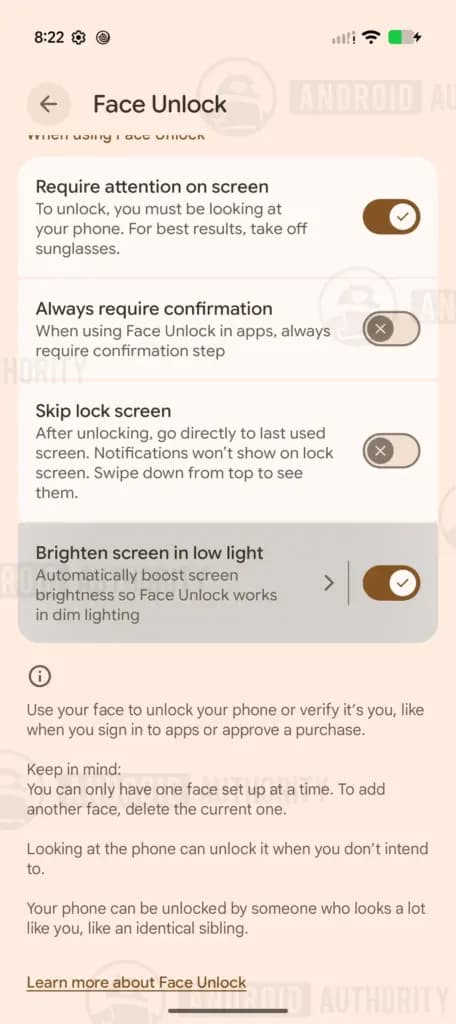
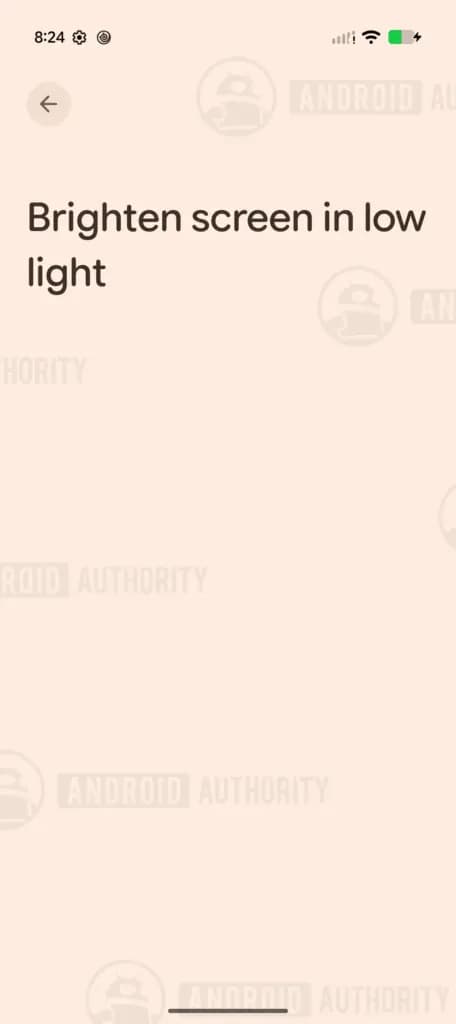
Source: Android Authority
Analysis of newly uncovered code strings, which were previously obfuscated in operating system files, reveals a setup dialog. Users will encounter a one-time confirmation prompt when first activating the tool. This prompt includes a warning that certain accessibility settings may temporarily behave differently whenever the screen brightens. The notice prepares device owners for these temporary interface changes during biometric scans.
Additional strings reference an adjustable brightness slider designed to let users calibrate display intensity. The control spans from a “Comfort” setting to a “Reliable” setting. The Comfort configuration applies reduced illumination, creating a softer visual experience that remains easy on the eyes in dim surroundings. Meanwhile, the Reliable option delivers higher or maximum brightness levels, which allows the Pixel to unlock reliably even in complete darkness.
The code outlines specific parameters controlling when the screen lights up. By default, the software only illuminates the panel if the front sensor detects at least a partially visible face. This default behavior prevents users from facing a jarring flash of light when checking their phone late at night. For situations where darkness is total, a dedicated “Complete darkness” toggle allows the display to brighten even when the sensor cannot see any part of the face.
<code><string name="active_illumination_bedtime_summary">Can brighten when Bedtime mode is on</string>
<string name="active_illumination_bedtime_title">Bedtime mode</string>
<string name="active_illumination_brightness_end_label">Reliable</string>
<string name="active_illumination_brightness_start_label">Comfort</string>
<string name="active_illumination_brightness_summary">Lower settings may reduce reliability</string>
<string name="active_illumination_brightness_title">Brightness level</string>
<string name="active_illumination_dark_summary">Can brighten to find your face when it’s too dark. When turned off, only brightens if your face is partially visible</string>
<string name="active_illumination_dark_title">Complete darkness</string>
<string name="active_illumination_dnd_summary">Can brighten when Do Not Disturb is on</string>
<string name="active_illumination_driving_summary">Can brighten when a car ride is detected</string>
<string name="active_illumination_driving_title">Driving</string>
<string name="active_illumination_footer_text">When this feature is turned on, the following accessibility settings may temporarily behave differently: extra dim, remove animations, or color inversion</string>
<string name="active_illumination_gating_category_title">Use screen brightening with</string>
<string name="face_active_illumination_dialog_message">When your screen brightens, accessibility settings may temporarily behave differently</string>
<string name="face_active_illumination_dialog_title">Turn on brighten screen in low light?</string>
<string name="face_active_illumination_dialog_turn_on">Turn on</string>
<string name="face_active_illumination_main_switch_title">Use screen brightening</string>
<string name="face_active_illumination_summary">Automatically boost screen brightness so Face Unlock works in dim lighting</string>
<string name="face_active_illumination_title">Brighten screen in low light</string>
<string name="face_active_illumination_top_intro">Automatically boost screen brightness so Face Unlock works in dim lighting</string></code>Google is also preparing granular controls to adjust the feature across different situations. Uncovered code strings point to discrete toggles for Bedtime hours, active Do Not Disturb periods, and driving. These contextual switches allow owners to disable illumination automatically during sleep or while operating a vehicle, avoiding sudden light flares during sensitive activities.
Google has not formally announced Face Active Illumination, and the unfinished state of the menus shows that implementation remains incomplete. The presence of blank configuration screens demonstrates that internal testing continues across Android 17 development channels. We at Droid Tools will track upcoming beta builds to observe how the interface matures and to see which Pixel models gain official support.

Robert Haba is the founder and editor-in-chief of Droid Tools. A lifelong gadget enthusiast with over a decade following the Android ecosystem, he built this publication to cut through the noise and give readers honest, real-world coverage of the tech they actually use.

Motorola Razr Ultra (2025) Android 17 rollout has begun for unlocked AT&T models, reportedly adding TikTok and reactivating Moto AI ahead of Android 18.

Samsung updated its Members app banner, signaling possible One UI 9.5 beta preparations that could lead to a December release for Galaxy S26 phones.
Some Samsung Galaxy S24 and S25 users report One UI 9 battery drain after the Android 17 update, though reports indicate the issue remains isolated.

Xiaomi has started the stable HyperOS 4 rollout in China, adding memory preloading and HyperCore kernel updates while global release dates remain unconfirmed.
The next story loads as you reach the end. You can also load it using the button.


Comments & Discussions
Join the conversation! We use Disqus to handle comments. Click the button below to load the comment section.