Skip to content
Droid Tools
Latest
/
NewsPhonesReviewsGuides

News & Features

  • NewsThe latest across mobile technology
  • ReviewsA closer look at devices & accessories
  • GuidesPractical tips & troubleshooting

Devices

  • PhonesLaunches, specs & what comes next
  • WearablesWatches, trackers & everyday tech

Software

  • AppsNew features & useful discoveries
  • Android OSUpdates, rollouts & security patches

In the spotlight

GuidesHow to block X posts in Google Discover using feed feedback settingsRead the story
All news
About Droid ToolsContact

Browse by brand

  • AppleiPhone, iPad & Apple Watch
  • SamsungGalaxy, One UI & more
  • GooglePixel, Android & Google apps
  • XiaomiXiaomi, Redmi & HyperOS
  • OnePlusPhones, watches & OxygenOS
  • HuaweiPhones, wearables & HarmonyOS
  • OppoFind, Reno & ColorOS
  • HonorMagic, wearables & MagicOS
  • MotorolaRazr, Edge & Moto

Latest from the brands

GuidesHow to block X posts in Google Discover using feed feedback settingsRead the story
Follow the brands behind your everyday tech.All phones

Deals & buying advice

Find your next upgrade.

Reported discounts on phones, wearables and accessories. Check each retailer for current pricing and availability.

Browse all deals

Recent deal coverage

  • WearablesSamsung Galaxy Watch 7 drops to $149 ahead of Black FridayRead the story
  • WearablesWasserstein Pixel Watch 4 & 5 travel charger drops to $18.99 for Black FridayRead the story
  • PhonesIs the Samsung Galaxy S26 Ultra Worth Buying in 2026?Read the story
All deals Explore our guides
  • About Us
  • Contact
  • Editorial Policy
  • Review Policy
  • Privacy Policy
  • Terms & Conditions
  • Cookie Policy
  • Affiliate Disclosure
  • Disclaimer
  • HTML Sitemap

Follow Droid Tools

FacebookXInstagramThreadsLinkedInBlueskyTikTokTelegramMastodonRSS Feed
Droid Tools

Droid Tools covers the latest Android news, device reviews, app updates, and OS guides. Independent mobile tech reporting and practical advice.

Explore

  • News
  • Phones
  • Apps
  • Android OS
  • Wearables
  • Guides
  • Reviews
  • Deals

Legal & Info

  • About Us
  • Contact
  • Editorial Policy
  • Review Policy
  • Privacy Policy
  • Terms & Conditions
  • Cookie Policy
  • Affiliate Disclosure
  • Disclaimer
  • HTML Sitemap
© 2026 Droid Tools. All rights reserved.
Home/OS/OPPO begins ColorOS 17 November 2026 update rollout in India

OPPO begins ColorOS 17 November 2026 update rollout in India

OPPO is rolling out the phased ColorOS 17 November 2026 update in India from November 1 to November 30, 2026, for nine unlisted flagship and upper-midrange models. It adds photo export presets, separate local deletion, OSee landscape mode, O+ Connect links, and caller announcements.

Cristian Penisoara• Guides Writer · Android Power User
Nov 25, 2026•OS•3 min read
OPPO begins ColorOS 17 November 2026 update rollout in India
0%
Share on XFacebookBluesky
Follow on Google
Trust this source on GoogleAlways see our reviews and tech guides first in search results
Add trusted source

OPPO has started distributing the ColorOS 17 November 2026 update in India through a phased rollout running in batches between November 1 and November 30, 2026. Following the operating system’s broader global debut, this monthly feature drop covers photography, cross-device connectivity, daily utility apps, and system stability. Nine flagship and upper-midrange OPPO models in India are part of the rollout, though the specific device list is not provided.

The release adds tools to reclaim local storage without losing cloud backups, maintain continuity between a phone and a Windows PC, and update everyday apps and home screen customization.

Rollout timeline and update steps

Because OTA packages roll out in stages across regions and IMEI batches, a device may receive the update prompt a few days after the initial window opens.

To check for the update manually, open Settings, scroll down to About device (or System & update), and tap the ColorOS banner at the top. Make sure the battery is charged above 60% and back up important files before installing.

Photo tools, OSee, and translation updates

In the native Photos app, users can choose from four quality presets before exporting or sharing a photo: Small (25%), Medium (50%), Large (75%), and Original. Choosing a smaller preset speeds up sharing high-resolution shots over messaging apps or slower networks while keeping control over file size.
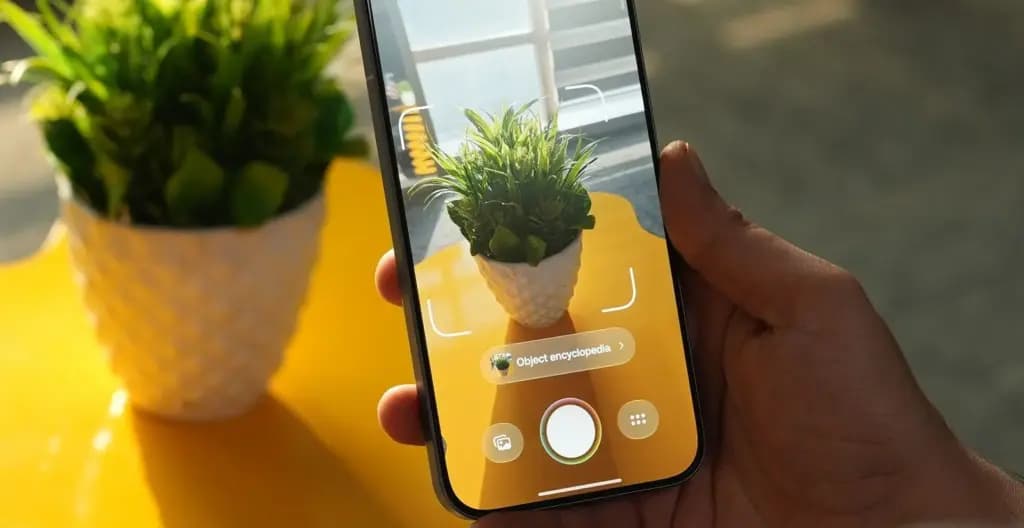
coloros OSee

Users can also free up internal storage by deleting local copies of photos directly from the handset while keeping the backed-up versions in the cloud. Cloud-backed deletions stay recoverable in the Recently Deleted folder for 60 days, while local-only items remain there for 30 days.

You may also likeRelated
OSGrapheneOS RCS proof of concept brings encrypted messaging without Google MessagesNov 25, 2026→OSSamsung One UI 9.5 beta adds 3D spatial wallpapers for Galaxy S26Nov 23, 2026→OSSamsung One UI 10 leak hints at frosted glass design and major visual refreshNov 22, 2026→

OPPO also updated its built-in visual and language tools. OSee, the integrated camera assistant, now works when holding a device horizontally in landscape orientation. Its viewfinder supports real-time object recognition as well, allowing users to point the camera at everyday items to identify them on the fly.

The system-level text translation engine is tuned to preserve sentence tone and context rather than delivering literal conversions. It also integrates a built-in dictionary for quick individual word lookups.

O+ Connect and daily utilities

Upgraded O+ Connect integration allows an OPPO smartphone to maintain simultaneous links across a phone, tablet, and PC. When initiating a remote connection between a phone and a paired computer, ColorOS 17 can automatically unlock the PC using stored credentials to avoid repetitive password prompts.

The update also refines core utility apps and the home screen. On models running OPPO’s native dialer, the Phone app can read incoming caller names aloud. Users can set those announcements to trigger every time or restrict them to when headphones or Bluetooth audio devices are connected.

The Calculator app offers a cleaner switch between Basic, Scientific, and Converter modes, along with a new History log for reviewing past figures. Its expanded converter handles currency, temperature, speed, length, area, volume, weight, pressure, power, and number systems.

On the home screen, users gain quick-access widgets for One-tap Boost, Storage Cleaner, Battery Usage, and Contacts. Exiting a hidden app now routes users straight back to the Home Screen for added privacy, and the update includes general under-the-hood stability optimizations.

Tags:#android17•#coloros•#india•#update
Cristian Penisoara
Cristian PenisoaraGuides Writer · Android Power User

Cristian Penisoara is a Guides Writer and Android specialist at Droid Tools. An Android user since version 2 and a professional event photographer, he combines technical curiosity with a detail-oriented approach - every guide he publishes is tested step-by-step on a real device before it goes live.
Next Story in OS

GrapheneOS RCS proof of concept brings encrypted messaging without Google Messages

A new GrapheneOS RCS proof of concept enables encrypted messaging compatible with Google and iOS while removing the need for Google Messages.

→

Latest Stories

Samsung Galaxy Edge could make a comeback in 2027 with a bold new design01

Samsung Galaxy Edge could make a comeback in 2027 with a bold new design

02

Google Messages feature remains under development alongside QuickStar and WhatsApp updates

03

Honor 700 series debuts with AI rear display, 9,000mAh battery, and Snapdragon chips

04

GrapheneOS RCS proof of concept brings encrypted messaging without Google Messages

Recommended Deal
-17% OFF
Ring Indoor Cam 2K

Ring Indoor Cam 2K

5.0(1,423 reviews)
$99.99$119.98
Buy on Amazon

* As an Amazon Associate, Droid Tools earns from qualifying purchases.

Top Deals

Samsung Galaxy Watch 7 drops to $149 ahead of Black Friday

Deal
Samsung Galaxy Watch 7 drops to $149 ahead of Black Friday

Wasserstein Pixel Watch 4 & 5 travel charger drops to $18.99 for Black Friday

Deal
Wasserstein Pixel Watch 4 & 5 travel charger drops to $18.99 for Black Friday

Is the Samsung Galaxy S26 Ultra Worth Buying in 2026?

Deal
Is the Samsung Galaxy S26 Ultra Worth Buying in 2026?

Continue reading

More from this category →
GrapheneOS
OSNov 25, 2026

GrapheneOS RCS proof of concept brings encrypted messaging without Google Messages

A new GrapheneOS RCS proof of concept enables encrypted messaging compatible with Google and iOS while removing the need for Google Messages.

By Luiza Mosneagu
One UI 9.5
OSNov 23, 2026

Samsung One UI 9.5 beta adds 3D spatial wallpapers for Galaxy S26

The One UI 9.5 beta brings a 3D Live effect for lock screen wallpapers on the Galaxy S26 series, requiring a 153MB Spatial Core add-on.

By Luiza Mosneagu
Samsung One UI 10 leak hints at frosted glass design and major visual refresh
OSNov 22, 2026

Samsung One UI 10 leak hints at frosted glass design and major visual refresh

A leaked One UI 10 banner inside Samsung firmware suggests a frosted glass redesign ahead of its expected launch with Android 18 next fall.

By Luiza Mosneagu
Samsung releases Galaxy S25 and S24 update with critical patches
OSNov 22, 2026

Samsung releases Galaxy S25 and S24 update with critical patches

Samsung updates the Galaxy S25 and S24 series with 20 critical Android and 3 One UI security patches, plus new system features and bug fixes.

By Luiza Mosneagu
Next in queue

Read the next article

The next story loads as you reach the end. You can also load it using the button.
Recommended Deals
1 / 7
Google Pixel 11 Pro

Google Pixel 11 Pro

4.9
$849.00$1,099.00-23%
Buy on Amazon
* As an Amazon Associate, Droid Tools earns from qualifying purchases. Read our editorial policy

Comments & Discussions

Join the conversation! We use Disqus to handle comments. Click the button below to load the comment section.
