
Android 16 QPR2 has made Google’s Pixel smartphones safer and smarter. Discover why you should get this update immediately, including new lock screen widgets, AI-powered notifications, and an essential security fix.
Google is finally releasing Android 16 QPR2 to compatible Pixel devices after much testing. Based on the most recent version of Android, this is the second quarterly release. It offers well-considered features and modifications, much like the initial release. More significantly, it contains the security update from December, which fixes a number of worrisome vulnerabilities.
The Pixel 10, Pixel 9, Pixel 8, Pixel 7, Pixel 6, Pixel Tablet, and Pixel Fold are all compatible with Android 16 QPR2. On my Pixel 9 Pro XL, the update is roughly 800 MB+ in size.
Google is still improving Android 16 QPR2’s user interface. Users may now add new shape options for app icons on the home screen, such as circle, squircle, four-sided cookie, seven-sided cookie, and arch.
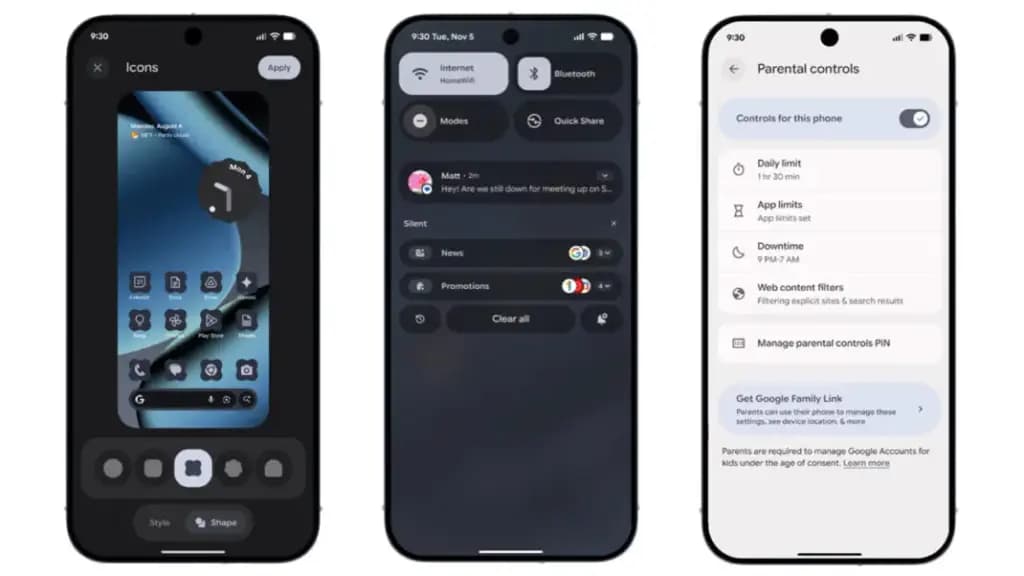
Additionally, users of Pixel phones now add widgets to the lock screen—a function that was previously exclusive to tablets. Although there are fewer widgets and layouts than on the home screen, you can still access them by swiping left on the lock screen.
A new low-light setting for the screen saver, which turns on a dim clock in dull scenes to conserve battery life, is one of the other lock screen modifications. Furthermore, fingerprint scanning can now operate on a switched-off display without requiring the screen to be woken.
We highlighted in the beta the ability to minimize or eliminate blur effects in background components like the quick settings and alerts panel. All users can now utilize this functionality. For better accessibility, blur can be disabled under the Color and Motion area and replaced with plain color.
Expanded dark mode, which compels apps that don’t support dark themes to switch to dark mode, is another accessibility improvement. Better yet, you can program expanded dark mode to activate on its own.
Additionally, Android 16 QPR2 has an upgraded HDR feature that allows you to change the HDR intensity. You can select brightness levels from dimmer to more vibrant using a slider.
In addition to 50:50, 70:30, and 30:70 ratios, the update offers a more adaptable split-screen arrangement that supports ratios like 90:10.
Additionally, Google is adding two new features to its AI-powered notifications: a notification organizer and notification summary. While the organizer automatically organizes alerts in the panel, summaries condense lengthy messages from apps. The apps that are included can be customized by users. The Pixel 9 and more recent variants with Gemini Nano support these functionalities.
Additionally, parental controls have been reinforced. More apps now allow parents to set secure PINs, set screen-time limits, plan downtime, and control timers right from the settings.
Additional accessibility-related features include Expressive Captions, which are real-time captions in social media apps and video communications that are enhanced with emoticons and ambient sound overlays. Google has improved Circle to Search to allow users to flag and report problematic messages in order to fight spam and scams. Additionally, the new Call Reason function will alert suspected spam calls or classify calls according to urgency.
The December security patch for Android 16 QPR2 addresses a number of issues. The update fixes vulnerabilities ranging from high to critical severity, some of which have already been exploited by attackers, according to Google’s security alert.
In addition to the eye-catching new features, Pixel owners should apply this update right now to lower the chance of attacks and keep safe from threats.
Other companies, including as Samsung, Xiaomi, and OnePlus, will also implement the December security patch, though the exact release date may differ.

Google Pixel Watch 5 (45mm)

Robert Haba is the founder and editor-in-chief of Droid Tools. A lifelong gadget enthusiast with over a decade following the Android ecosystem, he built this publication to cut through the noise and give readers honest, real-world coverage of the tech they actually use.
Google has officially released Android 17 QPR2 Beta 7 (build CP41.260831.016), delivering essential bug fixes to Pixel owners across several generations. The release builds on patches that arrived earlier in Android 17 QPR2 Beta 6 and in incremental builds such as Android 17 QPR2 Beta 6.1. Testing on newer Android development tracks continues at the […]
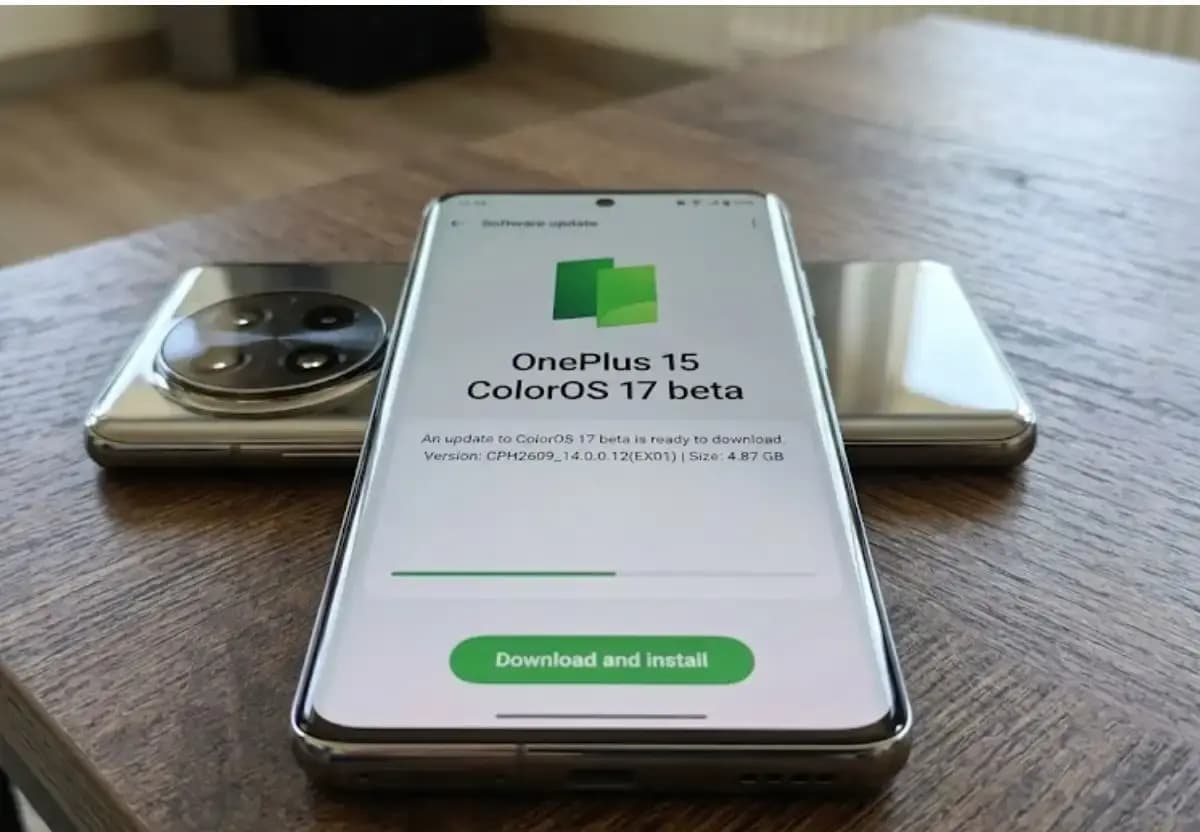
Some OnePlus 15 owners can now apply for the ColorOS 17 open beta and voluntarily move their phones from OxygenOS to ColorOS. OnePlus opened applications for the program, which for now is limited to users in India. The OnePlus 15 will be remembered as the swan song of OnePlus for its fans in the US […]

Xiaomi has confirmed that the HyperOS 4 stable update will start reaching users in China on October 15. The first batch of stable builds is meant for select Xiaomi, Redmi, and tablet owners, and the wait is nearly over. The news arrives as Xiaomi’s internal testing recruitment is scheduled to close on October 14. Because […]

Google has released Android 17 QPR2 Beta 7, the latest in a series of updates meant to fix issues and bugs affecting Android 17. The Alphabet subsidiary pushes these updates to Pixel models that still receive support from the company, and this beta reaches devices as old as the Pixel 6a. Installing it requires a […]
The next story loads as you reach the end. You can also load it using the button.


Comments & Discussions
Join the conversation! We use Disqus to handle comments. Click the button below to load the comment section.