






With Android 15 Beta 2, Google introduced a brilliant new “Adaptive Vibration” setting that lets Pixel phones use their microphones to change the intensity of vibration. Almost everyone has experienced a circumstance when their phone’s vibration was louder than the ringing it was supposed to replace. The ability to manually change the vibration intensity has existed for a while, but Google is now expanding on it.
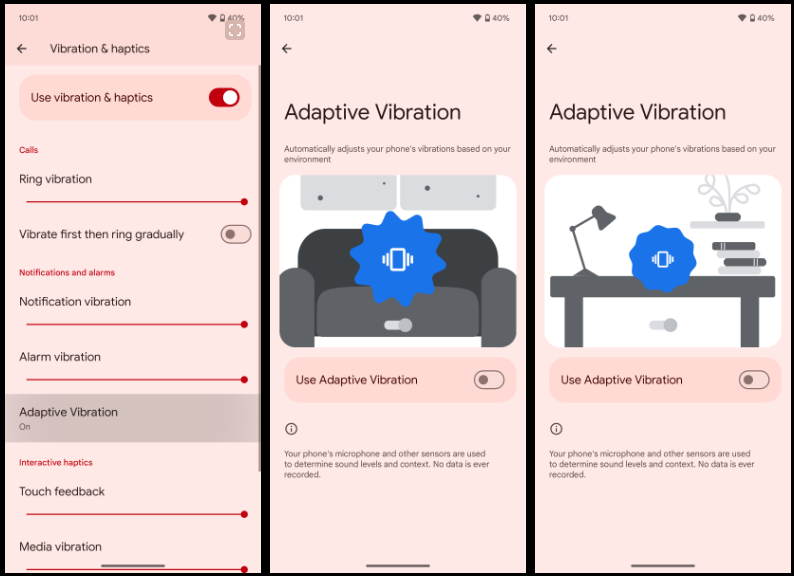
Google introduced “Adaptive Vibration” to Pixel Phones in Android 15 Beta 2. This new setting, located in Settings under the “Vibration & haptics” menu, is set to off by default. According to Google, the setting uses sensors to automatically modify the vibration intensity based on your environment.
According to the animation on the new Adaptive Vibration website, when the device is placed on a table, the vibration intensity decreases, which is what Pixel phones will do when the feature is enabled. The “Adaptive alert vibration” setting, which can reduce vibration intensity while the phone is face up with the screen on, is distinct from this.
The Pixel 7a introduced that capability. This feature appears to be helpful, but we will have to wait and see how it functions in practice. Although it is still disabled by default, the functionality was being developed in earlier beta editions, according to Android Authority. It is difficult to predict when these things will become live.
If Google’s various other “Adaptive” settings shown anything, it’s that this new option could prove invaluable to the experience in the long run.