Meta’s WhatsApp team appears to be testing a more cohesive layout for the emoji, GIF, and sticker pickers inside Android chats. Findings from an APK teardown of WhatsApp version 2.26.47.6, reported by Android Authority on November 24, 2026, show work-in-progress code that could replace the current multi-tab interface.
The WhatsApp team at Meta has recently been testing Android design updates aimed at bridging differences with the iOS app. Earlier in November 2026, Meta began rolling out a floating navigation bar on the app’s main screen for some beta users. That update has not yet reached everyone, and the code found in version 2.26.47.6 suggests WhatsApp could be testing a similar floating layout inside individual chats.
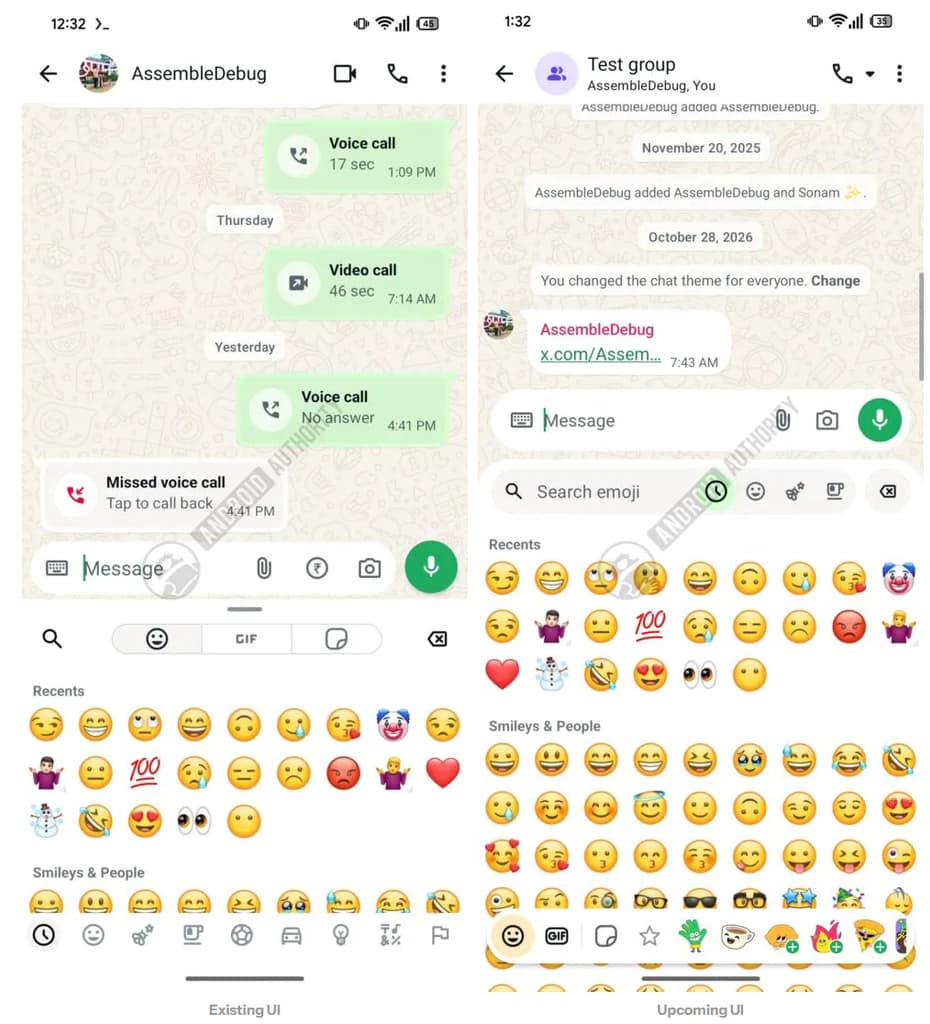
In the current Android app, emojis, GIFs, and stickers sit under three separate top tabs marked with elaborate text. The work-in-progress design removes that top tab bar and adds a floating navigation bar at the bottom of the screen. Dedicated buttons on the bar open the share sheets for emojis, GIFs, and stickers. On the right side, the teardown also reveals dedicated icons to unlock sticker packs, an option currently exclusive to the sticker picker.
Scrolling behavior could change alongside the navigation layout. Currently, grab handles let users expand the emoji, GIF, and sticker picker sheets to the entire screen. In version 2.26.47.6, WhatsApp also appears to have removed those grab handles, and the sheets could instead rely on more dynamic scrolling based on how far down a user needs to scroll.
Along with the floating bar, each section gets a broader search menu, plus options to discover and organize stickers. In the emoji picker, a pill-shaped search bar replaces the existing search icon, and category icons move from their separate bottom bar into the search bar itself. Those category icons work like a carousel, which should let users scroll through visible icons to reveal hidden ones.
Tapping the GIF icon in the floating navigation bar opens the updated GIF picker. It adds a new search bar alongside icons for categories such as funny, greetings, and celebrations. Two new buttons sit right below the search bar: Create sticker and Discover. While Create sticker is self-explanatory, Android Authority suspects Discover could be used to find sticker packs related to a GIF search, which may include favorite and paid sticker packs already available in WhatsApp.
Next to the GIF icon in the floating bar sits a sticker icon. Opening the sticker sheet shows a similar search bar and identical categories to sort stickers. It also includes buttons to Create and Discover stickers, joined by a new icon to Organize stickers that replaces the pencil-shaped icon in the current user interface.
None of these new features are available for users to try. Because the findings come from work-in-progress code in version 2.26.47.6, they may not ship.
Hidden code reveals Google Maps High Visibility mode with subdued colors and near-black dark mode, though no release timeline is confirmed.

Gemini Tasks in Google Messages beta reportedly brings price alerts, delivery updates, subscription reminders, and daily briefings to US users.

The Google Translate icon redesign swaps the folded-paper look for a blue-to-purple gradient on the web, while Android and iOS do not appear to have it yet.

A Pixel Weather update lets users submit local weather reports anonymously and updates weather warning containers to match the system Dynamic Color theme.
The next story loads as you reach the end. You can also load it using the button.
As an Amazon Associate, Droid Tools earns from qualifying purchases. Editorial policy



Comments & Discussions
Join the conversation! We use Disqus to handle comments. Click the button below to load the comment section.