Setting such much-needed digital limits is now easier than ever thanks to Android's initiative to give parents more control over their children's digital lives. The beta versions of Android 16 have been revealing some intriguing new features that point to a significant drive for improved child protection. In the Android Canary build, Google appears to ...

Setting such much-needed digital limits is now easier than ever thanks to Android’s initiative to give parents more control over their children’s digital lives. The beta versions of Android 16 have been revealing some intriguing new features that point to a significant drive for improved child protection. In the Android Canary build, Google appears to have begun testing a new parental limit feature, which represents a more significant change in the way Android phone supervision functions.
The Android Canary release channel, which is effectively Google’s sandbox for testing out experimental features, contains a new “Parental controls” setting that Android Authority has noticed. Parents will no longer need to search through Digital Wellbeing to establish some limits because the option is located directly within the main settings menu. Although it isn’t working right now, its positioning indicates that Google intends to prioritize parental settings over treating them as an afterthought.
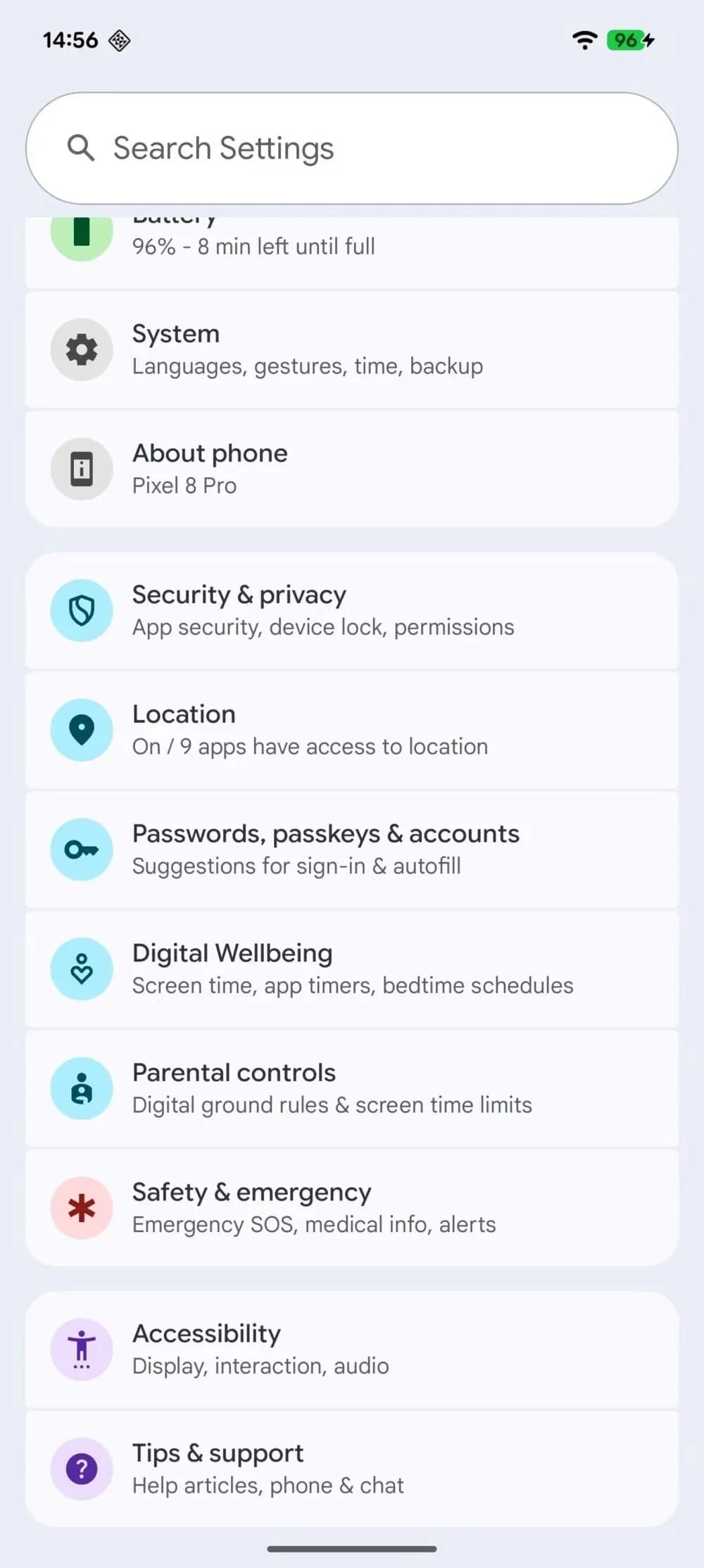
At the present, tapping the choice has no effect. Nevertheless, it appears that Google is coordinating these changes with more extensive enhancements anticipated in Android 16. For example, the Settings app’s “Supervision” feature, which might allow parents to ban specific online content, was hinted to in Android 16 Beta 4. But now, instead of having a jumble of menus, the focus is on integrating all of that.
In addition to being easier to use, Android 16 is also making it easier to weed out the less wholesome parts of the internet. To prevent explicit content from slipping through, new content blocking capabilities are on the horizon.
Simply enable device supervision and set up a PIN for the account you’re monitoring to activate these site filters. Next, you can filter out explicit photos, text, and links from Google Search and ban dubious websites in Chrome. These capabilities are intended to conceal the majority of problematic web content, making the Android experience considerably safer for younger users—though no filter is infallible.
It makes natural that Google is pushing for more straightforward parental tools as children spend more time online. Parents may soon have strong controls built into their phones rather than depending on third-party apps. It appears from the Canary updates that Google wants these features to be easy to use.

Samsung Galaxy Watch 8

Robert Haba is the founder and editor-in-chief of Droid Tools. A lifelong gadget enthusiast with over a decade following the Android ecosystem, he built this publication to cut through the noise and give readers honest, real-world coverage of the tech they actually use.

Developers can now run iOS on Android phones using a modified XNU kernel, though key features like cellular data and cameras remain broken on early ports.

Leaked European pricing for the Xiaomi 18 Pro points to a €1,449 starting price alongside smaller battery capacities and 90W charging.

Honor AI Smart Grip adjusts incoming call buttons based on your hand position as the MagicOS feature expands to Magic 6 phones and later models.

Google phone number verification reportedly links saved phone numbers across all signed-in Google accounts on an Android device without prompts.
The next story loads as you reach the end. You can also load it using the button.


Comments & Discussions
Join the conversation! We use Disqus to handle comments. Click the button below to load the comment section.