Android 17 and Wear OS 7 Are Rolling Out – Here’s What’s Fixed on Pixel Phones and Watches
Google is rolling out the stable Android 17 and Wear OS 7 updates for compatible Pixel phones and watches. Beyond the new features these releases bring, both updates come packed with bug fixes and general improvements aimed at smoothing out the overall experience. Many of the changes target long-standing annoyances, while several underlying improvements should ...
Google is rolling out the stable Android 17 and Wear OS 7 updates for compatible Pixel phones and watches. Beyond the new features these releases bring, both updates come packed with bug fixes and general improvements aimed at smoothing out the overall experience. Many of the changes target long-standing annoyances, while several underlying improvements should help with both performance and battery life on eligible Pixel devices.
For the Pixel 10 lineup, Android 17 addresses a number of display-related issues, including a white flickering dot that would appear near the top of the screen and various graphical glitches. There are also multiple camera-specific fixes in this build, aimed at improving stability and reducing unwanted memory leaks during use.
The full list of bug fixes and stability improvements for compatible Pixel phones has been published by Google.
What’s included
The June 2026 update includes bug fixes and improvements for Pixel users – see below for details
Apps
Fix for a system issue that causes certain background processes to crash unexpectedly*[1]
Fix for an issue where the Backup settings entry appears in search results but would not open when selected in certain conditions *[5]
Audio
Fix for an issue that causes system instability and performance delays when using Bluetooth audio devices*[1]
Battery & Charging
Fix for an issue that causes slow wireless charging speeds when the battery level is between 75% and 80% in certain conditions*[1]
Fix for an issue that causes wireless and wired charging drivers to fail to initialize correctly during device startup in certain conditions*[7]
Camera
Fix for a camera stability issue that causes the system to crash in certain conditions*[7]
Fix for an issue that causes the camera app to freeze when changing zoom levels while recording video*[5]
Fix for an issue that causes the camera service to occasionally crash, affecting overall system stability*[1]
Display & Graphics
Fix for an issue that causes a white flickering dot to appear at the top of the screen in certain conditions*[5]
Fix for an issue that causes display or graphical errors on certain device models during standard operation*[5]
Fix for an issue that causes the device to freeze and become unresponsive when connecting to an external display in certain conditions*[3]
Face Unlock
Fix for an issue that could cause the device to hang or crash when attempting to use face unlock in certain conditions*[1]
Framework
Fix for a camera stability issue that could cause the app to crash unexpectedly during use in certain conditions*[5]
Fix for an issue that causes location services to crash and restart unexpectedly in certain conditions*[7]
Fix for an issue that causes system memory leaks and performance issues, which could lead to devices becoming unresponsive or crashing*[1]
Fix for an issue that causes the keyboard area to become unresponsive and display incorrectly after unlocking the device*[1]
Fix for an issue that could cause a system crash when rotating the screen in certain conditions*[1]
Fix for an issue where the text input box in a notification bubble could unexpectedly disappear after rotating the device*[1]
Fix to improve battery life and performance in certain conditions*[1]
Location & GPS
Fix for an issue that affects GPS location accuracy and measurement reliability during voice calls on certain network configurations*[5]
System
Fix for a stability issue that could cause the device to unexpectedly restart during normal operation*[7]
Fix for an issue that causes system applications to crash during the device boot process in certain conditions*[1]
Fix for an issue that causes the device to crash or display a black screen in certain conditions*[1]
Fix for an issue that prevented apps from correctly managing SIM card subscriptions and carrier settings in certain conditions*[1]
Telephony
Fix for an issue that prevents certain devices from connecting to mobile networks or causes unexpected service interruptions in certain conditions*[1]
General improvements for network connection stability and performance in certain conditions*[1]
Touch
Fix for an issue that causes vibrations to stop working in certain conditions*[2]
User Interface
Fix for a crash in the home screen launcher under certain conditions*[1]
Fix for an issue that causes a system crash when a scrolling screenshot was cancelled immediately after being started in certain conditions*[1]
Fix for an issue that causes the launcher to crash when using AI icons in certain conditions*[4]
Fix for an issue that causes the Pixel Launcher to crash during certain system operations*[1]
Fix for an issue that causes the status bar and quick settings to occasionally disappear or become inaccessible in certain conditions*[1]
Fix for an issue that causes the system user interface to crash under certain conditions involving notifications and the lock screen*[1]
Fix for an issue where an external display connection causes the home screen to crash in certain conditions*[5]
Fix for an issue where media controls could become invisible on the lock screen when multiple media apps were active*[1]
Fix for an issue where the notification footer could become stuck over the notification shade or appear cut off on the lock screen in certain conditions*[1]
Fix for an issue where the screen could freeze and prevent users from returning to the home screen or switching apps in certain conditions*[1]
Fix for an issue where the taskbar could not be dismissed during certain user interactions*[6]
Since Google has only just begun rolling out Android 17 to Pixel devices, it’s worth keeping in mind that the update could take some time to reach individual phones.
Wear OS 7 improves the Gemini gesture on Pixel Watch
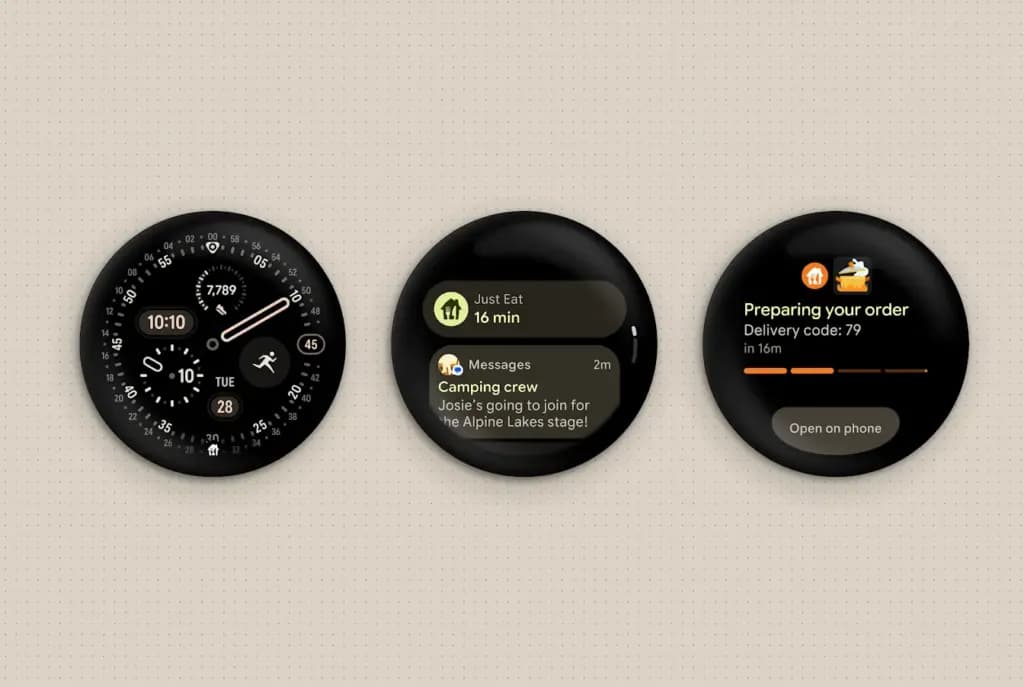
Compared to what Android 17 brings to Pixel phones, the Wear OS 7 update for Pixel Watch is relatively light on new features — most of the bigger additions aren’t expected until later this year. That said, similar to Android 17, Wear OS 7 focuses heavily on underlying bug fixes and usability refinements.
Among the changes is a new gesture model for Raise to Talk, designed to trigger Gemini more consistently than before. Another notable update is a redesigned three-button layout in the Contacts app for Wear OS. Google has also incorporated more Material 3 design elements into the Contacts app, including a larger contact photo, aimed at improving overall usability.
What’s Included
Improvements to Raise to Talk with Gemini
Improved gesture model for more robust and accurate Raise to Talk activation.
Remote Media Routing
Remote Media Routing lets users manage audio and video output devices from their paired Android phone using their Wear OS watch. This integration streamlines the multidevice experience, allowing for quick switching between outputs, such as Google Cast devices, Bluetooth headphones, and other smart displays and speakers directly from the wrist. With this feature, users no longer need to access their phone to change media playback destinations.
Wear Contacts changes
Three-button layout in Messages
Updating to include keyboard and voice search methods on the contact list screen to prevent the need to go to the “Recent Contacts” page on tapping search.
Layout changes
Changes aim to further utilize Material3 elements in brand new layouts to display the contact List and Card in a fresh new way. This includes the addition of quick action buttons and a larger contact photo within the contact card, and a brand new layout for favorite contacts on the contact list.
Loss of Pulse, Car Crash, and Fall Detection —now integrated with Emergency Sharing(1)
Automatically notify your emergency contacts when a hard fall, loss of pulse, or severe car crash is detected on your Pixel Phone or Watch.
These improvements are rolling out as part of the Wear OS 7 update for the Pixel Watch 2, Pixel Watch 3, and Pixel Watch 4.
Robert Haba is the founder and editor-in-chief of Droid Tools. A lifelong gadget enthusiast with over a decade following the Android ecosystem, he built this publication to cut through the noise and give readers honest, real-world coverage of the tech they actually use.



Comments & Discussions
Join the conversation! We use Disqus to handle comments. Click the button below to load the comment section.